0
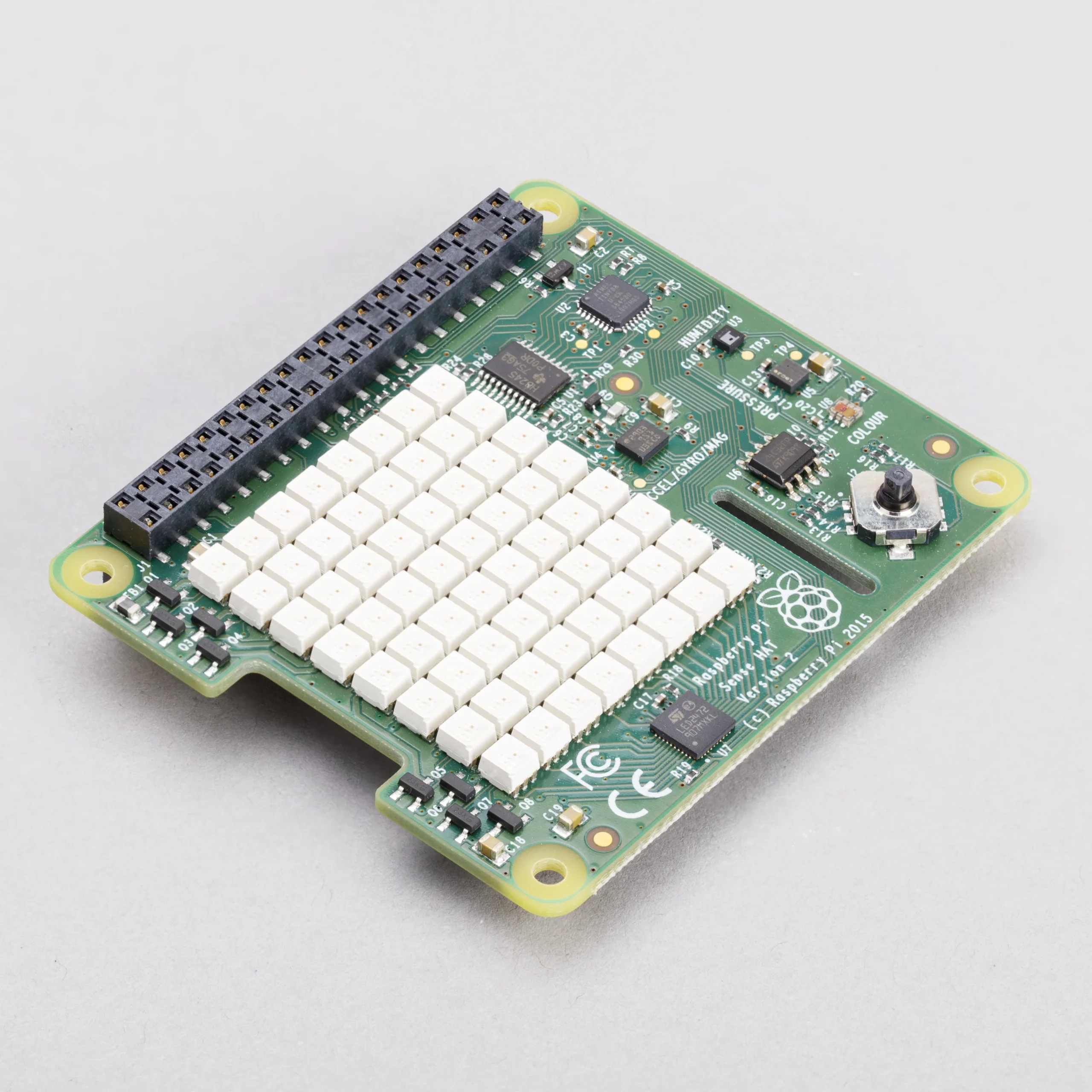
Raspberry Pi Sense HAT Board
89,000 د.ع
Build space-grade sensing projects with the Raspberry Pi Sense HAT, an official add-on board that transforms your Raspberry Pi into an Astro Pi—the same hardware used aboard the International Space Station for the European Space Agency’s educational program. This comprehensive sensor board provides an array of environmental and motion sensing capabilities combined with a vibrant 8×8 RGB LED matrix and a five-button joystick, making it the ultimate platform for experiments, data logging, interactive games, and STEM education
Only 2 left in stock
CompareDescription
Raspberry Pi Sense HAT – Orientation, Pressure, Humidity, and Temperature Sensor Board
Build space-grade sensing projects with the Raspberry Pi Sense HAT, an official add-on board that transforms your Raspberry Pi into an Astro Pi—the same hardware used aboard the International Space Station for the European Space Agency’s educational program. This comprehensive sensor board provides an array of environmental and motion sensing capabilities combined with a vibrant 8×8 RGB LED matrix and a five-button joystick, making it the ultimate platform for experiments, data logging, interactive games, and STEM education.
The Sense HAT attaches directly to the top of any Raspberry Pi with a 40-pin GPIO header, creating a compact, all-in-one sensing solution. The onboard sensors allow you to monitor orientation through a 9-axis inertial measurement unit combining accelerometer, gyroscope, and magnetometer, along with barometric pressure, humidity, and temperature. The 8×8 RGB LED matrix provides a programmable display for visualizing sensor data, displaying text messages, or creating retro-style games, while the mini joystick enables user interaction for menu navigation and game control.
Officially supported Python libraries make programming the Sense HAT simple and intuitive, with extensive documentation and example code available through the Raspberry Pi Foundation. Whether you’re building an environmental monitoring station, creating a physical data dashboard, teaching programming concepts, or experimenting with motion sensing, the Sense HAT delivers the same hardware capabilities used in real space missions.
Key Features
Complete Sensor Suite
Integrates a full 9-axis inertial measurement unit for orientation and motion detection, plus barometric pressure, humidity, and temperature sensors for comprehensive environmental monitoring.
8×8 RGB LED Matrix
Bright, programmable RGB LED display with 64 individual pixels for visualizing sensor data, scrolling text messages, animations, and retro game graphics.
Five-Button Joystick
Compact directional joystick provides user input for navigation, game control, and menu selection, detected as a standard input device.
High-Precision Motion Sensors
Gyroscope: Wide angular rate sensing range
Accelerometer: Adjustable linear acceleration sensing
Magnetometer: Magnetic field sensing for compass functionality
Environmental Sensors
Barometric Pressure: Wide absolute range for altitude measurement
Temperature: Accurate readings for climate monitoring
Relative Humidity: Precise humidity sensing for environmental applications
Astro Pi Heritage
Originally developed for the International Space Station as part of the Raspberry Pi Foundation’s educational program in partnership with the European Space Agency.
Official Software Support
Fully supported by the Raspberry Pi Foundation with an official Python library providing comprehensive access to all sensors, the LED matrix, and joystick.
Simple Installation
Single-command installation through the Raspbian repository for quick setup.
Specifications
| Parameter | Value |
|---|---|
| Product Name | Raspberry Pi Sense HAT |
| Compatibility | Any Raspberry Pi with 40-pin GPIO header |
| Sensors | Gyroscope, Accelerometer, Magnetometer, Temperature, Barometric Pressure, Humidity |
| Display | 8×8 RGB LED Matrix |
| Input Device | 5-button joystick |
| Connection | Direct GPIO attachment via 40-pin header |
| Programming | Python (sense-hat library), C++ |
| Mounting | Mounting holes with included standoffs |
Wiring Diagram
Hardware Installation
Raspberry Pi 40-pin GPIO -----> Sense HAT 40-pin connector
(Sense HAT stacks directly on top of Raspberry Pi)
Power Connection
5V and 3.3V from Raspberry Pi GPIO -----> Sense HAT power pins
Software Setup
Installation Commands
# Update package list
sudo apt update

# Install Sense HAT software
sudo apt install sense-hat

# For Python 3 (pre-installed on modern Raspberry Pi OS)
sudo apt install python3-sense-hat

# Enable I2C interface if not already enabled
sudo raspi-config
# Navigate to Interface Options > I2C > Enable
Python Code Examples
Reading All Sensors
from sense_hat import SenseHat
import time

sense = SenseHat()
sense.clear()

while True:
    # Read orientation
    orientation = sense.get_orientation()
    pitch = orientation["pitch"]
    roll = orientation["roll"]
    yaw = orientation["yaw"]

    # Read environmental sensors
    temperature = sense.get_temperature()
    pressure = sense.get_pressure()
    humidity = sense.get_humidity()

    # Display readings
    print(f"Pitch: {pitch:.2f}°, Roll: {roll:.2f}°, Yaw: {yaw:.2f}°")
    print(f"Temperature: {temperature:.1f}°C")
    print(f"Pressure: {pressure:.1f} hPa")
    print(f"Humidity: {humidity:.1f}%")
    print("-" * 40)

    time.sleep(2)
Displaying Text on LED Matrix
from sense_hat import SenseHat
import time

sense = SenseHat()
sense.clear()

# Display scrolling text in different colors
sense.show_message("Hello World!", text_colour=[255, 0, 0])
sense.show_message("Raspberry Pi", text_colour=[0, 255, 0])
sense.show_message("Sense HAT", text_colour=[0, 0, 255])

time.sleep(1)
sense.clear()
Simple Pixel Display
from sense_hat import SenseHat
import time

sense = SenseHat()
sense.clear()

# Define RGB colors
red = [255, 0, 0]
green = [0, 255, 0]
blue = [0, 0, 255]
yellow = [255, 255, 0]
cyan = [0, 255, 255]
magenta = [255, 0, 255]
white = [255, 255, 255]
black = [0, 0, 0]

# Draw a simple smiley face
pixels = [
    black, black, black, black, black, black, black, black,
    black, white, black, black, black, black, white, black,
    black, white, black, black, black, black, white, black,
    black, black, black, black, black, black, black, black,
    black, white, black, black, black, black, white, black,
    black, black, white, white, white, white, black, black,
    black, black, black, black, black, black, black, black,
    black, black, black, black, black, black, black, black
]

sense.set_pixels(pixels)
time.sleep(5)
sense.clear()
Joystick Input Example
from sense_hat import SenseHat
import time

sense = SenseHat()
sense.clear()

def joystick_event(event):
    """Handle joystick input"""
    if event.action == "pressed":
        if event.direction == "up":
            sense.show_message("UP")
        elif event.direction == "down":
            sense.show_message("DOWN")
        elif event.direction == "left":
            sense.show_message("LEFT")
        elif event.direction == "right":
            sense.show_message("RIGHT")
        elif event.direction == "middle":
            sense.show_message("PRESSED")

sense.stick.direction_any = joystick_event
sense.stick.direction_middle = joystick_event

print("Joystick test running. Press any direction.")
while True:
    time.sleep(0.1)
Common Applications
Environmental monitoring stations
Weather data logging and visualization
Motion sensing and gesture detection
Compass and orientation tracking
Interactive games and retro gaming projects
Physical data dashboards for IoT systems
Altitude and pressure monitoring
Educational STEM activities
Science fair experiments
Space and robotics simulation
Package Contents
1 x Raspberry Pi Sense HAT Board
1 x Set of 4 mounting standoffs
1 x Set of 4 mounting screws
(Raspberry Pi board not included)
وحدة استشعار Raspberry Pi Sense HAT – مستشعرات الاتجاه والضغط والرطوبة ودرجة الحرارة
ابنِ مشاريع استشعار على مستوى الفضاء باستخدام وحدة Raspberry Pi Sense HAT، وهي لوحة إضافية رسمية تحول Raspberry Pi الخاص بك إلى Astro Pi – نفس الأجهزة المستخدمة على متن محطة الفضاء الدولية للبرنامج التعليمي لوكالة الفضاء الأوروبية . توفر لوحة الاستشعار الشاملة هذه مجموعة من قدرات الاستشعار البيئي والحركي مع مصفوفة LED RGB 8×8 نابضة بالحياة وعصا تحكم بخمسة أزرار، مما يجعلها المنصة النهائية للتجارب وتسجيل البيانات والألعاب التفاعلية وتعليم STEM .
تتصل Sense HAT مباشرة بأعلى أي Raspberry Pi عبر رأس GPIO 40 دبوس، مما يخلق حلاً استشعارياً مدمجاً متكاملاً. تسمح لك المستشعرات المدمجة بمراقبة الاتجاه من خلال وحدة قياس القصور الذاتي بـ 9 محاور التي تجمع بين مقياس التسارع والجيروسكوب ومقياس المغناطيسية، بالإضافة إلى الضغط الجوي والرطوبة ودرجة الحرارة . توفر مصفوفة LED RGB 8×8 شاشة قابلة للبرمجة لتصور بيانات المستشعرات أو عرض الرسائل النصية أو إنشاء ألعاب على الطراز القديم، بينما تمكن عصا التحكم المصغرة المستخدم من التفاعل للتنقل في القوائم والتحكم في الألعاب .
تجعل المكتبات البرمجية المدعومة رسمياً من Python برمجة Sense HAT بسيطة وبديهية، مع توثيق واسع وأمثلة برمجية متاحة من خلال مؤسسة Raspberry Pi . سواء كنت تبني محطة مراقبة بيئية أو تصنع لوحة تحكم بيانات فعلية أو تدرس مفاهيم البرمجة أو تجرب استشعار الحركة، فإن Sense HAT تقدم نفس إمكانيات الأجهزة المستخدمة في المهام الفضائية الحقيقية .
المميزات الرئيسية
مجموعة استشعار كاملة
تدمج وحدة قياس قصور ذاتي كاملة بـ 9 محاور لاكتشاف الاتجاه والحركة، بالإضافة إلى مستشعرات الضغط الجوي والرطوبة ودرجة الحرارة للمراقبة البيئية الشاملة .
مصفوفة LED RGB 8×8
شاشة LED RGB قابلة للبرمجة مشرقة بـ 64 بكسل فردي لتصور بيانات المستشعرات والرسائل النصية المتحركة والرسوم المتحركة ورسومات الألعاب القديمة .
عصا تحكم بخمسة أزرار
عصا تحكم اتجاهية مدمجة توفر إدخالاً للمستخدم للتنقل والتحكم في الألعاب واختيار القوائم، ويتم اكتشافها كجهاز إدخال قياسي .
مستشعرات حركة عالية الدقة
الجيروسكوب: نطاق واسع لاستشعار المعدل الزاوي
مقياس التسارع: استشعار تسارع خطي قابل للتعديل
مقياس المغناطيسية: استشعار المجال المغناطيسي لوظيفة البوصلة
مستشعرات بيئية
الضغط الجوي: نطاق واسع لقياس الارتفاع
درجة الحرارة: قراءات دقيقة لمراقبة المناخ
الرطوبة النسبية: استشعار دقيق للرطوبة للتطبيقات البيئية
تراث Astro Pi
تم تطويرها في الأصل لمحطة الفضاء الدولية كجزء من البرنامج التعليمي لمؤسسة Raspberry Pi بالشراكة مع وكالة الفضاء الأوروبية .
دعم برمجي رسمي
مدعومة بالكامل من قبل مؤسسة Raspberry Pi بمكتبة Python رسمية توفر وصولاً شاملاً لجميع المستشعرات ومصفوفة LED وعصا التحكم .
تركيب بسيط
أمر تركيب واحد من خلال مستودع Raspbian للإعداد السريع .
المواصفات الفنية
| المعلمة | القيمة |
|---|---|
| اسم المنتج | Raspberry Pi Sense HAT |
| التوافق | أي Raspberry Pi برأس GPIO 40 دبوس |
| المستشعرات | جيروسكوب، مقياس تسارع، مقياس مغناطيسية، درجة حرارة، ضغط جوي، رطوبة |
| الشاشة | مصفوفة LED RGB 8×8 |
| جهاز الإدخال | عصا تحكم 5 أزرار |
| الاتصال | توصيل مباشر عبر رأس GPIO 40 دبوس |
| البرمجة | Python (مكتبة sense-hat)، C++ |
| التركيب | فتحات تثبيت مع دعامات متضمنة |
مخطط التوصيل
تركيب الأجهزة
رأس GPIO 40 دبوس في Raspberry Pi -----> موصل Sense HAT 40 دبوس
(تتراص Sense HAT مباشرة فوق Raspberry Pi)
توصيل الطاقة
5V و 3.3V من رأس GPIO في Raspberry Pi -----> دبابيس طاقة Sense HAT
إعداد البرمجيات
أوامر التثبيت
# تحديث قائمة الحزم
sudo apt update

# تثبيت برامج Sense HAT
sudo apt install sense-hat

# تثبيت مكتبة Python 3
sudo apt install python3-sense-hat

# تمكين واجهة I2C إذا لم تكن مفعلة
sudo raspi-config
# انتقل إلى Interface Options > I2C > Enable
أمثلة برمجية بلغة Python
قراءة جميع المستشعرات
from sense_hat import SenseHat
import time

sense = SenseHat()
sense.clear()

while True:
    orientation = sense.get_orientation()
    pitch = orientation["pitch"]
    roll = orientation["roll"]
    yaw = orientation["yaw"]

    temperature = sense.get_temperature()
    pressure = sense.get_pressure()
    humidity = sense.get_humidity()

    print(f"Pitch: {pitch:.2f}°, Roll: {roll:.2f}°, Yaw: {yaw:.2f}°")
    print(f"Temperature: {temperature:.1f}°C")
    print(f"Pressure: {pressure:.1f} hPa")
    print(f"Humidity: {humidity:.1f}%")
    print("-" * 40)

    time.sleep(2)
عرض نص على مصفوفة LED
from sense_hat import SenseHat
import time

sense = SenseHat()
sense.clear()

sense.show_message("Hello World!", text_colour=[255, 0, 0])
sense.show_message("Raspberry Pi", text_colour=[0, 255, 0])
sense.show_message("Sense HAT", text_colour=[0, 0, 255])

time.sleep(1)
sense.clear()
مثال عصا التحكم
from sense_hat import SenseHat
import time

sense = SenseHat()
sense.clear()

def joystick_event(event):
    if event.action == "pressed":
        if event.direction == "up":
            sense.show_message("UP")
        elif event.direction == "down":
            sense.show_message("DOWN")
        elif event.direction == "left":
            sense.show_message("LEFT")
        elif event.direction == "right":
            sense.show_message("RIGHT")
        elif event.direction == "middle":
            sense.show_message("PRESSED")

sense.stick.direction_any = joystick_event
sense.stick.direction_middle = joystick_event

while True:
    time.sleep(0.1)
التطبيقات الشائعة
محطات المراقبة البيئية
تسجيل بيانات الطقس وتصورها
استشعار الحركة واكتشاف الإيماءات
البوصلة وتتبع الاتجاه
ألعاب تفاعلية ومشاريع ألعاب قديمة
لوحات تحكم بيانات فعلية لأنظمة إنترنت الأشياء
مراقبة الارتفاع والضغط
أنشطة STEM التعليمية
تجارب المعارض العلمية
محاكاة الفضاء والروبوتات
محتويات العلبة
1 × لوحة استشعار Raspberry Pi Sense HAT
1 × مجموعة من 4 دعامات تثبيت
1 × مجموعة من 4 براغي تثبيت


Reviews
There are no reviews yet