0
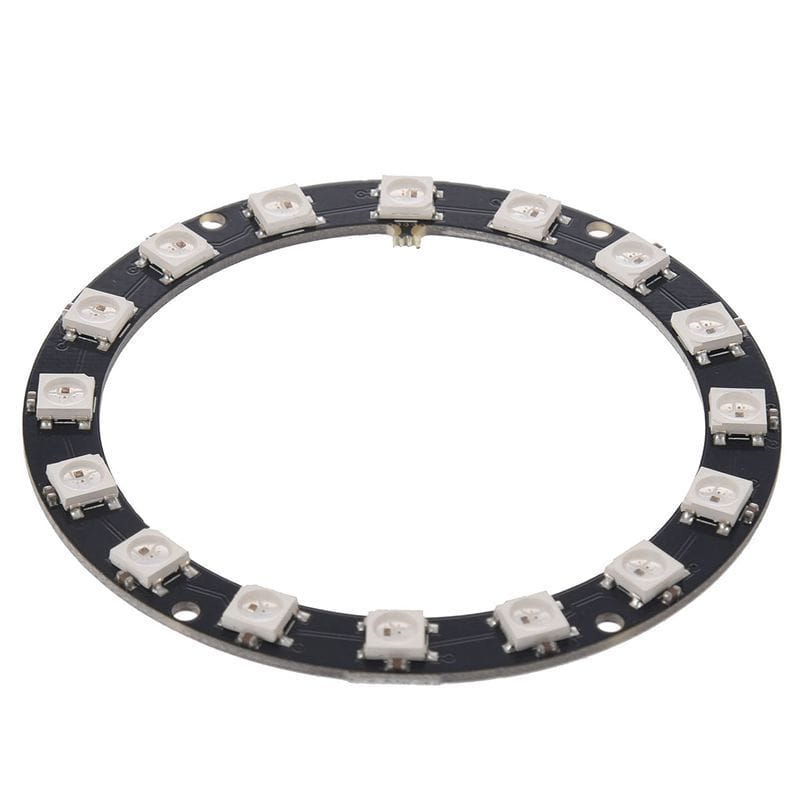
16 LED WS2812 RGB Circle Board
4,000 د.ع
Add stunning circular lighting effects to your electronics projects with this 16 Bit WS2812 RGB LED Circle Board, a compact and versatile addressable RGB LED ring featuring 16 individually controllable WS2812 LEDs arranged in a circular formation. Each LED on this ring module contains an integrated WS2812 driver chip, allowing you to control every LED independently using just a single digital pin from your microcontroller. Whether you’re building ambient lighting for a project enclosure, creating an electronic compass display, designing a clock face, or adding decorative effects to a cosplay prop, this 16-LED ring provides a vibrant and easily programmable lighting solution.
In stock
CompareDescription
16 Bit WS2812 RGB LED Circle Board – Addressable RGB Ring Light Module for Arduino
Add stunning circular lighting effects to your electronics projects with this 16 Bit WS2812 RGB LED Circle Board, a compact and versatile addressable RGB LED ring featuring 16 individually controllable WS2812 LEDs arranged in a circular formation. Each LED on this ring module contains an integrated WS2812 driver chip, allowing you to control every LED independently using just a single digital pin from your microcontroller. Whether you’re building ambient lighting for a project enclosure, creating an electronic compass display, designing a clock face, or adding decorative effects to a cosplay prop, this 16-LED ring provides a vibrant and easily programmable lighting solution.
The ring operates on a standard 5V DC power supply and features a simple 3-wire or 4-wire interface with clearly marked pads for power, ground, and data input. An additional data output pad allows you to daisy-chain multiple rings or other WS2812-based LED strips and modules, creating larger, more complex lighting arrays while still using only one microcontroller pin. Each WS2812 LED is a 5050 SMD package with an integrated driver, and the total current draw for the full ring at maximum brightness is approximately 1A, so adequate power supply is recommended for full-brightness applications.
Key Features
16 Individually Addressable RGB LEDs
Each of the 16 WS2812 LEDs can be individually programmed to display any color from a 24-bit palette, enabling complex animations, color gradients, and chaser effects across the circular array.
Single-Pin Control
All 16 LEDs are controlled via a single digital I/O pin on your microcontroller using a high-speed one-wire protocol, saving valuable GPIO pins for other sensors and components.
5V DC Operation
The ring operates on a standard 5V DC supply, making it compatible with Arduino, ESP32, Raspberry Pi, STM32, and other common 5V or 3.3V logic systems.
Daisy-Chain Capable
The onboard data output pad allows you to connect multiple rings or WS2812 strips in series, creating larger displays while still using only one microcontroller pin.
Ultra-Bright 5050 SMD LEDs
Each LED uses the popular 5050 SMD package with high brightness and wide 120-degree viewing angle for even illumination around the ring.
Simple 3-Wire Interface
Easy connection with just VCC (5V), GND, and DIN (Data In) pads. Solder wires directly or use pin headers for breadboard prototyping.
Specifications
| Parameter | Value |
|---|---|
| LED Type | WS2812 (built-in driver) |
| Number of LEDs | 16 |
| LED Package | 5050 SMD |
| Input Voltage | 5V DC |
| Max Current (Full White) | Approximately 1A (60mA per LED) |
| Color Depth | 24-bit (16.7 million colors) |
| Control Interface | Single-wire (DI) |
| Data Output | DO (for daisy-chaining) |
| Viewing Angle | 120 degrees |
| PCB Diameter | Approximately 45mm |
| PCB Thickness | 1.6mm |
| Operating Temperature | -25°C to +80°C |
Pin Configuration
| Pad | Function | Description |
|---|---|---|
| 5V | Power Input | Connect to 5V DC power supply |
| GND | Ground | Connect to power supply and microcontroller ground |
| DIN | Data Input | Connect to microcontroller digital output pin |
| DO | Data Output | Connect to next LED strip/ring input for daisy-chaining |
Wiring Diagram
Basic Connection (Single Ring)
Arduino/ESP32                WS2812 Ring
----------------             -----------
5V                 ----->    5V
GND                ----->    GND
Digital Pin (e.g., 6) ----> DIN
Daisy-Chain Multiple Rings
Microcontroller ----> Ring 1 (DIN) ----> Ring 1 (DO) ----> Ring 2 (DIN)
                                     └----> Ring 1 (DO) ----> Ring 2 (DIN)
5V and GND must be connected to all rings in parallel
Arduino Code Example (Adafruit NeoPixel Library)
#include <Adafruit_NeoPixel.h>

#define LED_PIN    6       // Data pin connected to DIN
#define LED_COUNT  16      // Number of LEDs on the ring

Adafruit_NeoPixel strip(LED_COUNT, LED_PIN, NEO_GRB + NEO_KHZ800);

void setup() {
  strip.begin();
  strip.show();            // Initialize all pixels to off
  strip.setBrightness(50); // Set brightness (0-255)
}

void loop() {
  // Color wipe animation
  colorWipe(strip.Color(255, 0, 0), 50);   // Red
  colorWipe(strip.Color(0, 255, 0), 50);   // Green
  colorWipe(strip.Color(0, 0, 255), 50);   // Blue

  // Rainbow chase animation
  rainbowCycle(20);
}

void colorWipe(uint32_t color, int wait) {
  for (int i = 0; i < strip.numPixels(); i++) {
    strip.setPixelColor(i, color);
    strip.show();
    delay(wait);
  }
}

void rainbowCycle(int wait) {
  for (long firstPixelHue = 0; firstPixelHue < 5 * 65536; firstPixelHue += 256) {
    for (int i = 0; i < strip.numPixels(); i++) {
      int pixelHue = firstPixelHue + (i * 65536L / strip.numPixels());
      strip.setPixelColor(i, strip.gamma32(strip.ColorHSV(pixelHue)));
    }
    strip.show();
    delay(wait);
  }
}
Arduino Code Example (Pulse Effect)
#include <Adafruit_NeoPixel.h>

#define LED_PIN    6
#define LED_COUNT  16

Adafruit_NeoPixel strip(LED_COUNT, LED_PIN, NEO_GRB + NEO_KHZ800);

void setup() {
  strip.begin();
  strip.show();
  strip.setBrightness(100);
}

void loop() {
  // Breathing/pulse effect
  for (int brightness = 0; brightness < 255; brightness++) {
    for (int i = 0; i < strip.numPixels(); i++) {
      strip.setPixelColor(i, strip.Color(brightness, 0, brightness / 2));
    }
    strip.show();
    delay(5);
  }

  for (int brightness = 255; brightness > 0; brightness--) {
    for (int i = 0; i < strip.numPixels(); i++) {
      strip.setPixelColor(i, strip.Color(brightness, 0, brightness / 2));
    }
    strip.show();
    delay(5);
  }
}
FastLED Library Example
#include <FastLED.h>

#define LED_PIN     6
#define NUM_LEDS    16
#define BRIGHTNESS  64

CRGB leds[NUM_LEDS];

void setup() {
  FastLED.addLeds<WS2812, LED_PIN, GRB>(leds, NUM_LEDS);
  FastLED.setBrightness(BRIGHTNESS);
}

void loop() {
  // Fill with solid red
  fill_solid(leds, NUM_LEDS, CRGB::Red);
  FastLED.show();
  delay(1000);

  // Fill with solid green
  fill_solid(leds, NUM_LEDS, CRGB::Green);
  FastLED.show();
  delay(1000);

  // Fill with solid blue
  fill_solid(leds, NUM_LEDS, CRGB::Blue);
  FastLED.show();
  delay(1000);

  // Rotating rainbow effect
  static uint8_t hue = 0;
  for (int i = 0; i < NUM_LEDS; i++) {
    leds[i] = CHSV(hue + (i * 10), 255, 255);
  }
  FastLED.show();
  hue++;
  delay(20);
}
Common Applications
Ambient lighting for PC cases and electronics enclosures
Electronic compass and direction indicators
Clock and timer displays
DIY smart home lighting accents
Wearable electronics and cosplay props
Audio-reactive music visualizers
Decorative mood lighting
Educational electronics projects
Holiday and event decorations
Status indicators for IoT devices
Important Usage Notes
For full brightness operation, use a stable 5V power supply rated for at least 1A
When daisy-chaining multiple rings, calculate total current and use appropriate power supply
For long wire runs, add a capacitor (1000µF) across 5V and GND near the ring to smooth power delivery
A series resistor (330-470Ω) on the data line can help prevent signal reflections on long cables
The ring can be powered through the 5V and GND pads using soldered wires or pin headers
For 3.3V microcontrollers (ESP32, Raspberry Pi), a logic level converter (3.3V to 5V) on the data line is recommended for reliable performance
Avoid staring directly at the LEDs at full brightness; they can be very intense
Package Contents
1 x 16 Bit WS2812 RGB LED Circle Board
لوحة دائرية WS2812 RGB LED 16 بت – وحدة إضاءة حلقية قابلة للعنونة لـ Arduino
أضف تأثيرات إضاءة دائرية مذهلة إلى مشاريعك الإلكترونية باستخدام لوحة WS2812 RGB LED الدائرية 16 بت، وهي حلقة إضاءة LED مضغوطة ومتعددة الاستخدامات تتميز بـ 16 مصباح WS2812 قابلة للتحكم الفردي مرتبة في تشكيل دائري. يحتوي كل مصباح LED على شريحة تحكم WS2812 مدمجة، مما يسمح لك بالتحكم في كل مصباح بشكل مستقل باستخدام دبوس رقمي واحد فقط من المتحكم الدقيق الخاص بك. سواء كنت تبني إضاءة محيطة لعلبة مشروع، أو تنشئ شاشة بوصلة إلكترونية، أو تصمم وجه ساعة، أو تضيف تأثيرات زخرفية إلى دعامة تنكرية، فإن حلقة 16 LED هذه توفر حلاً نابضًا بالحياة وقابلًا للبرمجة بسهولة.
تعمل الحلقة على مصدر طاقة قياسي 5V DC وتتميز بواجهة بسيطة بثلاثة أو أربعة أسلاك مع وسادات محددة بوضوح للطاقة والأرضي وبيانات الدخل. تسمح وسادة خرج البيانات الإضافية بتوصيل حلقات متعددة أو شرائط LED أخرى قائمة على WS2812 في سلسلة، مما يخلق ترتيبات إضاءة أكبر وأكثر تعقيدًا مع استخدام دبوس متحكم دقيق واحد فقط. كل مصباح WS2812 هو حزمة SMD 5050 مع مشغل مدمج، ويبلغ إجمالي استهلاك التيار للحلقة الكاملة عند أقصى سطوع حوالي 1 أمبير، لذا يوصى باستخدام مصدر طاقة مناسب لتطبيقات السطوع الكامل.
المميزات الرئيسية
16 مصباح RGB قابل للعنونة الفردية
يمكن برمجة كل من مصابيح WS2812 الـ 16 بشكل فردي لعرض أي لون من لوحة 24 بت، مما يتيح رسومًا متحركة معقدة وتدرجات لونية وتأثيرات مطاردة عبر المصفوفة الدائرية.
تحكم بدبوس واحد
يتم التحكم في جميع مصابيح LED الـ 16 عبر دبوس إدخال/إخراج رقمي واحد على المتحكم الدقيق الخاص بك، مما يوفر دبابيس GPIO الثمينة لأجهزة الاستشعار والمكونات الأخرى.
تشغيل بجهد 5V
تعمل الحلقة على مصدر طاقة قياسي 5V، مما يجعلها متوافقة مع Arduino و ESP32 و Raspberry Pi و STM32 والأنظمة المنطقية الأخرى الشائعة 5V أو 3.3V.
قابلة للتوصيل التسلسلي
تسمح وسادة خرج البيانات المدمجة بتوصيل حلقات متعددة أو شرائط WS2812 في سلسلة، مما يخلق شاشات أكبر مع الاستمرار في استخدام دبوس متحكم دقيق واحد فقط.
مصابيح SMD 5050 فائقة السطوع
يستخدم كل مصباح حزمة SMD 5050 الشائعة مع سطوع عالٍ وزاوية رؤية واسعة 120 درجة لإضاءة متساوية حول الحلقة.
واجهة بسيطة 3 أسلاك
اتصال سهل مع VCC و GND و DIN. قم بلحام الأسلاك مباشرة أو استخدم رؤوس دبابيس للنمذجة الأولية على لوحة التجارب.
المواصفات الفنية
| المعامل | القيمة |
|---|---|
| نوع LED | WS2812 |
| عدد المصابيح | 16 |
| حزمة LED | 5050 SMD |
| جهد الدخل | 5V |
| التيار الأقصى (أبيض كامل) | حوالي 1 أمبير |
| عمق الألوان | 24 بت |
| واجهة التحكم | سلك واحد |
| زاوية الرؤية | 120 درجة |
| قطر PCB | حوالي 45 مم |
| سمك PCB | 1.6 مم |
تكوين الأطراف
| الوسادة | الوظيفة |
|---|---|
| 5V | طاقة 5V |
| GND | أرضي |
| DIN | دخل البيانات |
| DO | خرج البيانات |
كود Arduino مثال
#include <Adafruit_NeoPixel.h>

#define LED_PIN    6
#define LED_COUNT  16

Adafruit_NeoPixel strip(LED_COUNT, LED_PIN, NEO_GRB + NEO_KHZ800);

void setup() {
  strip.begin();
  strip.show();
  strip.setBrightness(50);
}

void loop() {
  // أحمر
  for (int i = 0; i < strip.numPixels(); i++) {
    strip.setPixelColor(i, strip.Color(255, 0, 0));
  }
  strip.show();
  delay(1000);

  // أخضر
  for (int i = 0; i < strip.numPixels(); i++) {
    strip.setPixelColor(i, strip.Color(0, 255, 0));
  }
  strip.show();
  delay(1000);

  // أزرق
  for (int i = 0; i < strip.numPixels(); i++) {
    strip.setPixelColor(i, strip.Color(0, 0, 255));
  }
  strip.show();
  delay(1000);
}
التطبيقات الشائعة
إضاءة محيطة لحالات الكمبيوتر والعلب الإلكترونية
شاشات البوصلة الإلكترونية ومؤشرات الاتجاه
شاشات الساعات والمؤقتات
إضاءة المنزل الذكي DIY
الإلكترونيات القابلة للارتداء ودعائم التنكر
معززات الموسيقى التفاعلية مع الصوت
إضاءة الحالة المزاجية الزخرفية
مشاريع الإلكترونيات التعليمية
ديكورات العطلات والمناسبات
مؤشرات الحالة لأجهزة إنترنت الأشياء
محتويات العلبة
1 × لوحة دائرية WS2812 RGB LED 16 بت
Reviews
There are no reviews yet