0
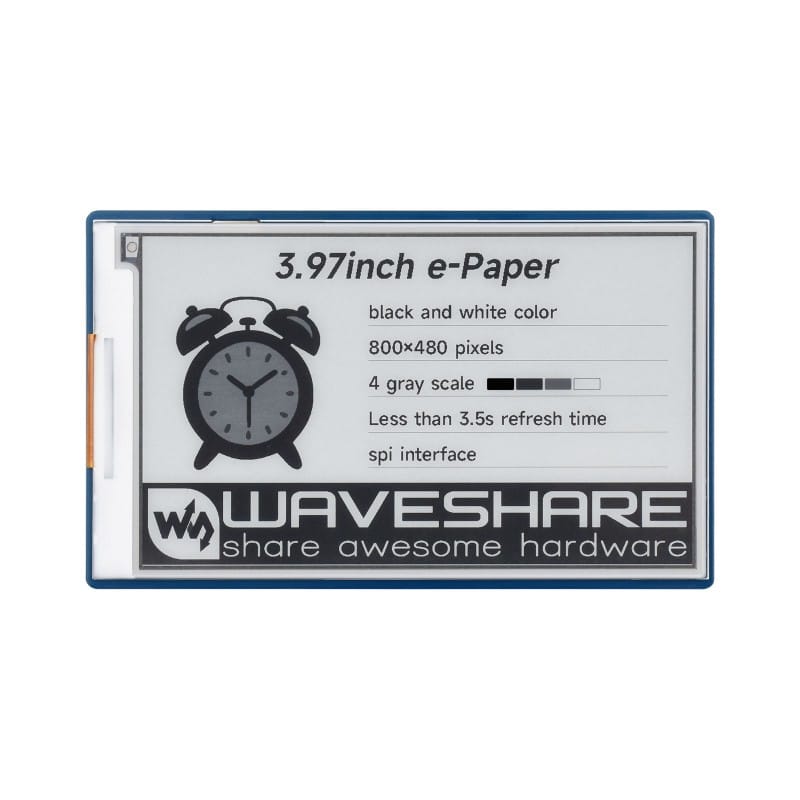
3.97 Inch E-Paper Display Module
50,000 د.ع
Create ultra-low-power, paper-like visual displays for your Raspberry Pi and other microcontroller projects with this 3.97 Inch E-Paper Display Module. Featuring a 800×480 pixel resolution with 4 grey scales, this e-ink display delivers crisp, high-contrast text and images that remain visible even after power is removed, making it ideal for electronic shelf labels, weather stations, digital signage, and battery-powered IoT applications
In stock
CompareDescription
3.97 Inch E-Paper Display – 800×480 Pixels E-Ink Display Module with 4 Grey Scales, SPI Interface, Standard Raspberry Pi 40-Pin GPIO Header
Create ultra-low-power, paper-like visual displays for your Raspberry Pi and other microcontroller projects with this 3.97 Inch E-Paper Display Module. Featuring a 800×480 pixel resolution with 4 grey scales, this e-ink display delivers crisp, high-contrast text and images that remain visible even after power is removed, making it ideal for electronic shelf labels, weather stations, digital signage, and battery-powered IoT applications.
The display utilizes electrophoretic technology that reflects light like real paper, providing excellent readability in bright sunlight and wide viewing angles without backlight power consumption. The 3.97-inch screen size offers a generous active area of approximately 84.8mm x 50.8mm, providing ample space for displaying information, graphics, and user interfaces while maintaining a compact form factor.
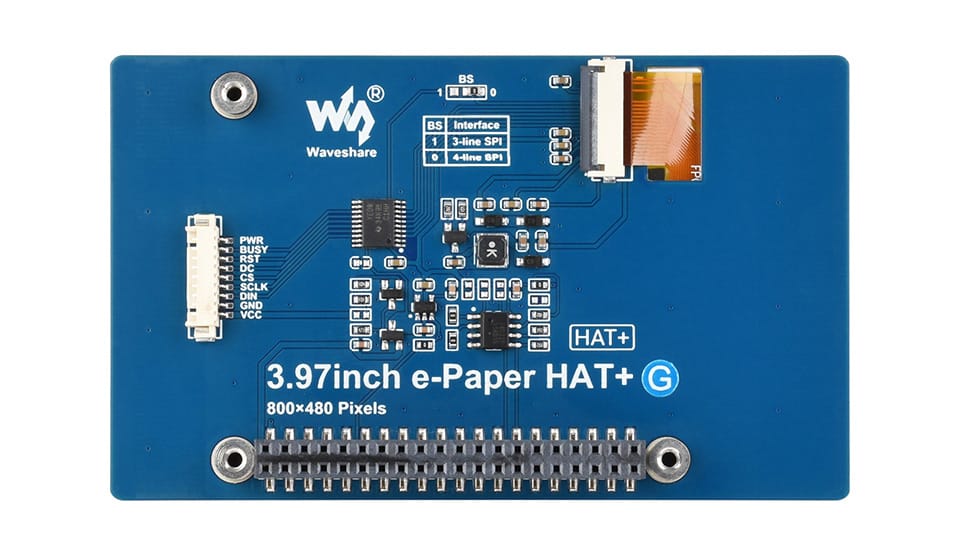
This module features a standard Raspberry Pi 40-pin GPIO header for direct connection to Raspberry Pi boards, as well as breakout pins for use with Arduino, ESP32, STM32, and other microcontrollers via SPI interface. The e-paper display requires power only during screen updates, consuming minimal energy when displaying static content, making it perfect for battery-powered and energy-harvesting applications.
Key Features
High-Resolution 800×480 Display
Delivers crisp, detailed images and text with 800×480 pixel resolution, providing ample screen real estate for complex interfaces, data visualization, and readable text at various font sizes.
4 Grey Scale Support
Supports four grey levels (2-bit grayscale), enabling smooth gradient effects and improved image quality compared to simple black-and-white displays.
Ultra-Low Power Consumption
Consumes power only during screen refreshes; displays static content indefinitely with zero power consumption, making it ideal for battery-powered applications and energy-harvesting devices.
Paper-Like Readability
E-paper technology reflects ambient light like real paper, providing excellent readability in direct sunlight and wide viewing angles without glare or backlight washout.
Standard Raspberry Pi 40-Pin GPIO Header
Designed for direct connection to Raspberry Pi boards, with onboard level shifting and power management for seamless integration with Raspberry Pi’s 3.3V logic.
SPI Interface
Communicates via standard SPI protocol, compatible with Raspberry Pi, Arduino, ESP32, STM32, and virtually any microcontroller with SPI support.
Partial Refresh Support
Supports partial screen updates, allowing you to update specific areas of the display without refreshing the entire screen, reducing power consumption and update time.
Onboard Level Shifting
Includes onboard level shifting circuitry, making it compatible with both 3.3V and 5V logic systems without additional components.
Wide Operating Temperature
Designed for reliable operation across a broad temperature range, suitable for indoor and outdoor applications.
Memory-Saving Design
The display controller includes built-in frame buffer, reducing the memory requirements on your host microcontroller.
Specifications
| Parameter | Value |
|---|---|
| Display Size | 3.97 inch |
| Resolution | 800 x 480 pixels |
| Grey Scale | 4 levels (2-bit) |
| Active Area | 84.80mm x 50.80mm |
| Pixel Pitch | 0.106mm x 0.106mm |
| Display Technology | E-Paper (E-Ink) |
| Interface | SPI (Serial Peripheral Interface) |
| Logic Voltage | 3.3V / 5V (level shifted) |
| Operating Voltage | 3.3V DC |
| Power Consumption | < 0.2W (typical during refresh), 0W when static |
| Refresh Time | Approximately 1-2 seconds (full refresh) |
| Partial Refresh | Supported (faster than full refresh) |
| Connector | 40-pin GPIO header (compatible with Raspberry Pi) |
| Dimensions | 93.5mm x 70.5mm x 8.5mm |
| Operating Temperature | -20°C to +60°C |
| Compatibility | Raspberry Pi, Arduino, ESP32, STM32, any SPI-enabled microcontroller |
Pin Configuration
| Pin | Function | Description |
|---|---|---|
| VCC | 3.3V Power | Power supply for the display |
| GND | Ground | Common ground |
| DIN | SPI MOSI | SPI data input |
| CLK | SPI SCK | SPI clock input |
| CS | Chip Select | SPI chip select (active low) |
| DC | Data/Command | Selects data or command mode |
| RST | Reset | Display reset (active low) |
| BUSY | Busy | Busy signal (display busy during refresh) |
*Note: The module includes a 40-pin GPIO header for direct connection to Raspberry Pi, with the above pins connected to appropriate GPIO pins.*
Wiring Diagram
Raspberry Pi Connection (Direct via GPIO Header)
Raspberry Pi 40-pin GPIO -----> E-Paper Module 40-pin Header
(Stack directly or connect via ribbon cable)
Arduino Connection (via SPI)
E-Paper Module          Arduino Uno
--------------          -----------
VCC            ----->    3.3V (or 5V with level shifter)
GND            ----->    GND
DIN            ----->    Pin 11 (MOSI)
CLK            ----->    Pin 13 (SCK)
CS             ----->    Pin 10
DC             ----->    Pin 9
RST            ----->    Pin 8
BUSY           ----->    Pin 7
Raspberry Pi Setup
Enable SPI Interface
# Open Raspberry Pi configuration
sudo raspi-config
# Navigate to Interface Options > SPI > Enable
# Reboot the Raspberry Pi
Install Required Libraries
# Install Python development tools
sudo apt update
sudo apt install python3-pip python3-pil

# Install Waveshare e-paper library
pip3 install waveshare-epaper
Python Code Example (Raspberry Pi)
import time
from waveshare_epaper import epaper3in97

def main():
    # Initialize display
    epd = epaper3in97.EPD()
    epd.init()

    # Clear screen
    epd.Clear(0xFF)  # White

    # Create image (800x480)
    from PIL import Image, ImageDraw, ImageFont

    # Create white background image
    image = Image.new('L', (800, 480), 255)  # 255 = white
    draw = ImageDraw.Draw(image)

    # Draw text
    font = ImageFont.load_default()
    draw.text((50, 200), "Hello, E-Paper!", font=font, fill=0)  # 0 = black
    draw.text((50, 250), "3.97 inch 800x480", font=font, fill=0)
    draw.text((50, 300), "4 Grey Scales", font=font, fill=128)  # 128 = gray

    # Display image
    epd.display(epd.getbuffer(image))

    print("Image displayed successfully")

    # Enter sleep mode to save power
    epd.sleep()

if __name__ == "__main__":
    main()
Arduino Code Example (Using SPI)
#include <SPI.h>

// Pin definitions
#define CS_PIN   10
#define DC_PIN   9
#define RST_PIN  8
#define BUSY_PIN 7

void setup() {
  Serial.begin(115200);
  SPI.begin();

  pinMode(CS_PIN, OUTPUT);
  pinMode(DC_PIN, OUTPUT);
  pinMode(RST_PIN, OUTPUT);
  pinMode(BUSY_PIN, INPUT);

  // Reset display
  digitalWrite(RST_PIN, LOW);
  delay(10);
  digitalWrite(RST_PIN, HIGH);
  delay(10);

  // Wait for display ready
  while (digitalRead(BUSY_PIN) == HIGH);

  Serial.println("E-Paper Display Ready");

  // Display initialization and drawing code here
  // (Refer to manufacturer library for complete implementation)
}

void loop() {
  // Your display update code here
}
Common Applications
Electronic shelf labels (ESL)
Weather stations and environmental monitors
Digital signage and information displays
Battery-powered IoT dashboards
E-readers and document viewers
Smart home control panels
Industrial equipment displays
Medical device interfaces
Educational demonstration tools
Important Usage Notes
The display retains images even when power is removed; no refresh needed for static content
Full refresh takes approximately 1-2 seconds; avoid frequent full refreshes to maximize display lifespan
Partial updates are faster but may show ghosting; use full refresh periodically for best image quality
Handle the display carefully; the glass substrate is fragile
Avoid exposing to extreme temperatures or humidity for extended periods
Store unused displays in a cool, dry place with protective cover to prevent damage
Package Contents
1 x 3.97 Inch E-Paper Display Module
(Raspberry Pi or other microcontroller not included)
شاشة E-Paper 3.97 بوصة – وحدة عرض E-Ink بدقة 800×480 بكسل مع 4 درجات رمادية، واجهة SPI، رأس GPIO 40 دبوس متوافق مع Raspberry Pi
أنشئ شاشات عرض مرئية فائقة الانخفاض في استهلاك الطاقة تشبه الورق لمشاريع Raspberry Pi والمتحكمات الدقيقة الخاصة بك باستخدام وحدة شاشة E-Paper 3.97 بوصة. تتميز هذه الشاشة الإلكترونية بدقة 800×480 بكسل مع 4 درجات رمادية، وتقدم نصوصًا وصورًا عالية التباين تظل مرئية حتى بعد إزالة الطاقة، مما يجعلها مثالية للملصقات الإلكترونية للرفوف ومحطات الطقس واللافتات الرقمية وتطبيقات إنترنت الأشياء التي تعمل بالبطارية .
تستخدم الشاشة تقنية التحليل الكهربائي التي تعكس الضوء مثل الورق الحقيقي، مما يوفر قابلية قراءة ممتازة في ضوء الشمس المباشر وزوايا رؤية واسعة دون استهلاك طاقة الإضاءة الخلفية. يوفر حجم الشاشة 3.97 بوصة منطقة نشطة سخية حوالي 84.8 مم × 50.8 مم، مما يوفر مساحة وافرة لعرض المعلومات والرسومات وواجهات المستخدم مع الحفاظ على شكل مضغوط .
تتميز هذه الوحدة برأس GPIO قياسي 40 دبوس لـ Raspberry Pi للتوصيل المباشر بلوحات Raspberry Pi، بالإضافة إلى دبابيس توصيل للاستخدام مع Arduino و ESP32 و STM32 والمتحكمات الدقيقة الأخرى عبر واجهة SPI. تتطلب شاشة E-Paper الطاقة فقط أثناء تحديثات الشاشة، وتستهلك طاقة ضئيلة عند عرض محتوى ثابت، مما يجعلها مثالية للتطبيقات التي تعمل بالبطارية وحصاد الطاقة .
المميزات الرئيسية
شاشة عالية الدقة 800×480
توفر صورًا ونصوصًا حادة ومفصلة بدقة 800×480 بكسل، مما يوفر مساحة شاشة كافية للواجهات المعقدة وتصور البيانات والنصوص المقروءة بأحجام خطوط مختلفة .
دعم 4 درجات رمادية
تدعم أربعة مستويات رمادية، مما يتيح تأثيرات تدرج سلسة وجودة صورة محسنة مقارنة بالشاشات الأبيض والأسود البسيطة .
استهلاك طاقة منخفض للغاية
تستهلك الطاقة فقط أثناء تحديثات الشاشة؛ تعرض المحتوى الثابت إلى أجل غير مسمى باستهلاك طاقة صفر، مما يجعلها مثالية للتطبيقات التي تعمل بالبطارية وأجهزة حصاد الطاقة .
قابلية قراءة تشبه الورق
تعكس تقنية E-Paper الضوء المحيط مثل الورق الحقيقي، مما يوفر قابلية قراءة ممتازة في ضوء الشمس المباشر وزوايا رؤية واسعة بدون وهج أو بهتان الإضاءة الخلفية .
رأس GPIO قياسي 40 دبوس لـ Raspberry Pi
مصممة للتوصيل المباشر بلوحات Raspberry Pi، مع تحويل مستوى مدمج وإدارة طاقة للتكامل السلس مع منطق 3.3V لـ Raspberry Pi .
واجهة SPI
تتواصل عبر بروتوكول SPI القياسي، متوافقة مع Raspberry Pi و Arduino و ESP32 و STM32 وأي متحكم دقيق تقريبًا يدعم SPI .
دعم التحديث الجزئي
تدعم تحديثات الشاشة الجزئية، مما يسمح لك بتحديث مناطق محددة من الشاشة دون تحديث الشاشة بأكملها، مما يقلل استهلاك الطاقة ووقت التحديث .
تحويل مستوى مدمج
تتضمن دوائر تحويل مستوى مدمجة، مما يجعلها متوافقة مع كل من أنظمة المنطق 3.3V و 5V دون مكونات إضافية .
نطاق درجة حرارة تشغيل واسع
مصممة للتشغيل الموثوق عبر نطاق واسع من درجات الحرارة، مناسبة للتطبيقات الداخلية والخارجية .
تصميم موفر للذاكرة
يتضمن وحدة التحكم في الشاشة مخزنًا مؤقتًا مدمجًا للإطارات، مما يقلل متطلبات الذاكرة على المتحكم الدقيق المضيف .
المواصفات الفنية
| المعلمة | القيمة |
|---|---|
| حجم الشاشة | 3.97 بوصة |
| الدقة | 800 × 480 بكسل |
| التدرج الرمادي | 4 مستويات |
| المنطقة النشطة | 84.80 مم × 50.80 مم |
| تقنية العرض | E-Paper |
| الواجهة | SPI |
| جهد المنطق | 3.3V / 5V |
| جهد التشغيل | 3.3V |
| استهلاك الطاقة | < 0.2 واط أثناء التحديث |
| وقت التحديث | حوالي 1-2 ثانية |
| التحديث الجزئي | مدعوم |
| الموصل | رأس GPIO 40 دبوس |
| الأبعاد | 93.5 مم × 70.5 مم × 8.5 مم |
| درجة حرارة التشغيل | -20°C إلى +60°C |
تكوين الدبابيس
| الدبوس | الوظيفة |
|---|---|
| VCC | طاقة 3.3V |
| GND | أرضي |
| DIN | بيانات SPI |
| CLK | ساعة SPI |
| CS | اختيار الشريحة |
| DC | بيانات/أمر |
| RST | إعادة ضبط |
| BUSY | إشارة انشغال الشاشة |
مخطط التوصيل
توصيل Raspberry Pi (مباشرة عبر رأس GPIO)
رأس GPIO 40 دبوس في Raspberry Pi -----> رأس 40 دبوس في وحدة E-Paper
(توضع مباشرة أو توصل عبر كابل شريطي)
توصيل Arduino (عبر SPI)
وحدة E-Paper               Arduino Uno
--------------             -----------
VCC            ----->      3.3V
GND            ----->      GND
DIN            ----->      دبوس 11 (MOSI)
CLK            ----->      دبوس 13 (SCK)
CS             ----->      دبوس 10
DC             ----->      دبوس 9
RST            ----->      دبوس 8
BUSY           ----->      دبوس 7
إعداد Raspberry Pi
تمكين واجهة SPI
sudo raspi-config
# انتقل إلى Interface Options > SPI > Enable
# أعد تشغيل Raspberry Pi
تثبيت المكتبات المطلوبة
sudo apt update
sudo apt install python3-pip python3-pil
pip3 install waveshare-epaper
كود Python مثال (Raspberry Pi)
import time
from waveshare_epaper import epaper3in97

def main():
    epd = epaper3in97.EPD()
    epd.init()
    epd.Clear(0xFF)

    from PIL import Image, ImageDraw, ImageFont

    image = Image.new('L', (800, 480), 255)
    draw = ImageDraw.Draw(image)

    font = ImageFont.load_default()
    draw.text((50, 200), "مرحباً، شاشة E-Paper!", font=font, fill=0)
    draw.text((50, 250), "3.97 بوصة 800x480", font=font, fill=0)
    draw.text((50, 300), "4 درجات رمادية", font=font, fill=128)

    epd.display(epd.getbuffer(image))
    epd.sleep()

if __name__ == "__main__":
    main()
التطبيقات الشائعة
الملصقات الإلكترونية للرفوف
محطات الطقس والمراقبة البيئية
اللافتات الرقمية وشاشات المعلومات
لوحات معلومات إنترنت الأشياء التي تعمل بالبطارية
أجهزة القراءة الإلكترونية وعارضات المستندات
لوحات التحكم المنزلية الذكية
شاشات المعدات الصناعية
محتويات العلبة
1 × وحدة شاشة E-Paper 3.97 بوصة


Reviews
There are no reviews yet