0
Waveshare GamePi13 LCD Game Console
20,000 د.ع
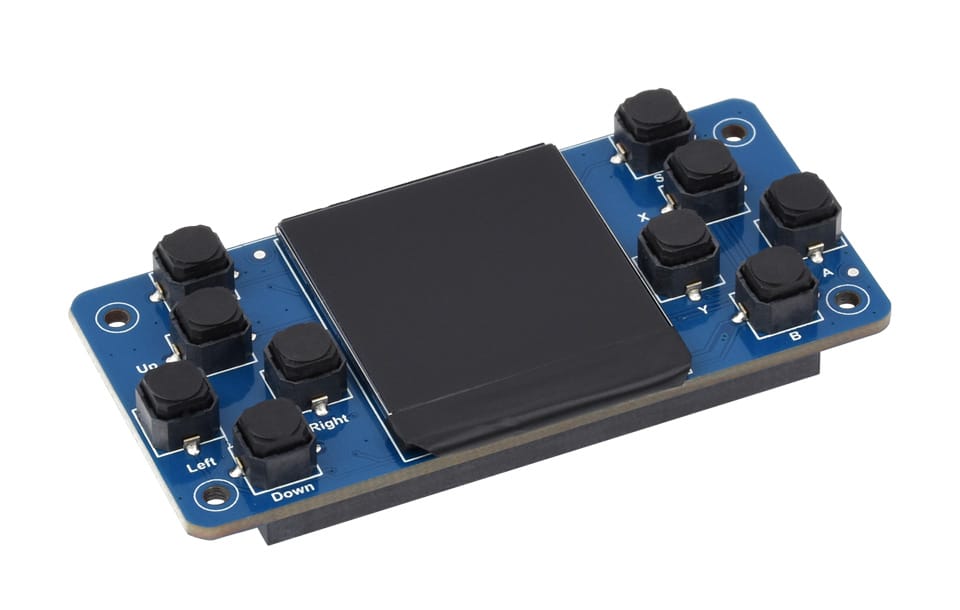
Transform your Raspberry Pi Zero into a compact retro gaming handheld with the Waveshare GamePi13, a purpose-built LCD game console expansion board that combines a high-quality 1.3-inch IPS display with 12 programmable buttons. This complete gaming HAT turns your Pi Zero into a dedicated emulation machine capable of running thousands of classic games via RetroPie and Recalbox systems, making it the perfect project for retro gaming enthusiasts and DIY makers alike
In stock
CompareDescription
Waveshare GamePi13 1.3inch LCD Game Console for Raspberry Pi – 240×240 Resolution, ST7789 Driver, SPI Communication
Transform your Raspberry Pi Zero into a compact retro gaming handheld with the Waveshare GamePi13, a purpose-built LCD game console expansion board that combines a high-quality 1.3-inch IPS display with 12 programmable buttons. This complete gaming HAT turns your Pi Zero into a dedicated emulation machine capable of running thousands of classic games via RetroPie and Recalbox systems, making it the perfect project for retro gaming enthusiasts and DIY makers alike.
The GamePi13 features a 1.3-inch IPS LCD screen with 240×240 resolution and 65K color support, delivering crisp, vibrant visuals with wide 160-degree viewing angles. The integrated ST7789 driver chip communicates via SPI interface for fast and efficient data transfer, ensuring smooth graphics rendering even during intense gaming sessions. The 12-button layout includes a D-pad, A/B/X/Y action buttons, SELECT, START, and MENU buttons, providing complete control for nearly any retro game title.
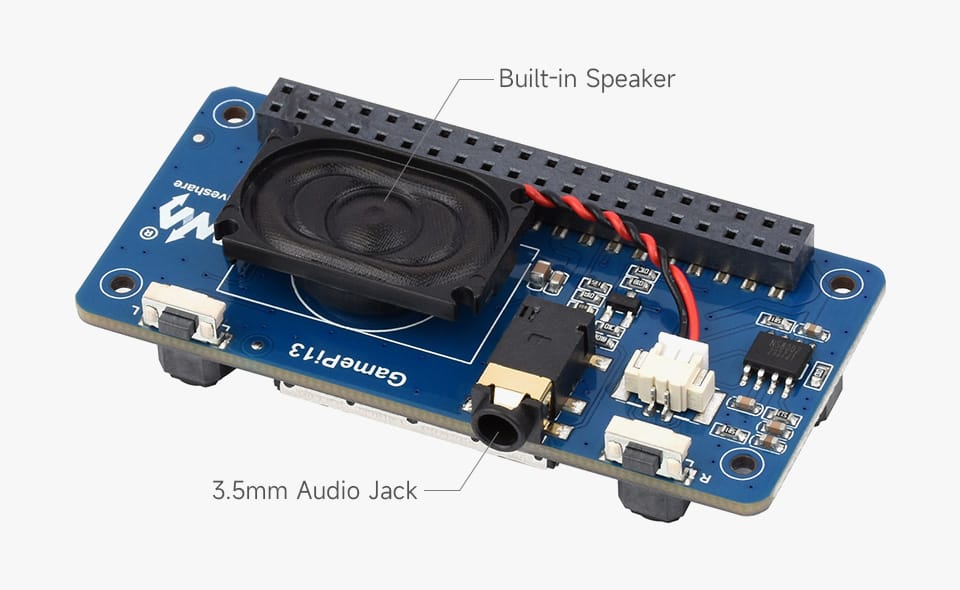
The board is designed to stack directly onto the Raspberry Pi Zero (Zero, Zero W, Zero 2 W) via the 40-pin GPIO header, creating a compact, handheld form factor. The GamePi13 includes a holder for 18650 batteries, allowing you to create a truly portable gaming system without external power. An onboard battery management circuit with charging capability keeps your device powered during extended play sessions.
Key Features
1.3-Inch IPS LCD Display
Features a 1.3-inch IPS LCD screen with 240×240 resolution and 65K color support, providing crisp, vibrant visuals with wide 160-degree viewing angles for excellent visibility from any angle.
12 Programmable Buttons
Includes a complete gaming control layout: D-pad (up, down, left, right), A/B/X/Y action buttons, SELECT, START, and MENU buttons, providing full control for retro gaming emulators.
ST7789 Display Driver
Integrated ST7789 driver chip with SPI communication interface ensures fast and efficient data transfer for smooth graphics rendering.
Direct Raspberry Pi Zero Compatibility
Designed to stack directly onto Raspberry Pi Zero, Zero W, and Zero 2 W via the 40-pin GPIO header, creating a compact, handheld gaming device.
18650 Battery Holder
Includes an onboard holder for 18650 lithium batteries, enabling truly portable gaming without external power sources.
Battery Charging Circuit
Onboard battery management circuit with charging capability allows you to recharge 18650 batteries directly via the USB port.
RetroPie and Recalbox Support
Fully compatible with popular retro gaming operating systems including RetroPie and Recalbox, with pre-configured drivers and button mapping.
Compact Handheld Form Factor
Measures just 105mm x 55mm, creating a comfortable, pocket-sized gaming device when combined with a Raspberry Pi Zero.
Lightweight Design
The complete assembly (Pi Zero + GamePi13 + battery) is lightweight and comfortable for extended gaming sessions.
Easy Assembly
Requires no soldering – simply attach the Raspberry Pi Zero to the GPIO header, insert a battery, and install the software.
Specifications
| Parameter | Value |
|---|---|
| Display Size | 1.3 inch |
| Display Resolution | 240 x 240 pixels |
| Display Type | IPS LCD |
| Color Depth | 65K colors |
| Viewing Angle | 160 degrees |
| Driver IC | ST7789 |
| Interface | SPI |
| Buttons | 12 (D-pad (4), A/B/X/Y (4), SELECT, START, MENU) |
| Battery Type | 18650 Lithium (1 cell) |
| Battery Charging | Onboard charging circuit |
| Compatibility | Raspberry Pi Zero, Zero W, Zero 2 W |
| Operating Systems | RetroPie, Recalbox |
| Dimensions | 105mm x 55mm |
| Mounting | 40-pin GPIO header (stackable) |
Button Configuration
| Button | Function |
|---|---|
| D-pad Up | Up direction |
| D-pad Down | Down direction |
| D-pad Left | Left direction |
| D-pad Right | Right direction |
| A | Action button A |
| B | Action button B |
| X | Action button X |
| Y | Action button Y |
| SELECT | Select button |
| START | Start button |
| MENU | Menu/function button |
Wiring Diagram
Assembly Instructions
Raspberry Pi Zero (Zero/Zero W/Zero 2 W)
                |
                | (Stack via 40-pin GPIO header)
                |
Waveshare GamePi13
                |
                | (Connect 18650 battery to holder)
                |
           Battery (18650)
Power Connection
18650 Battery (+) -----> Battery Holder (+)
18650 Battery (-) -----> Battery Holder (-)
(Onboard charging circuit manages power distribution)
Software Installation
RetroPie Setup
-
Download the latest RetroPie image for Raspberry Pi Zero from the official website
-
Flash the image to a microSD card using Raspberry Pi Imager or BalenaEtcher
-
Insert the microSD card into your Raspberry Pi Zero
-
Connect the GamePi13 to the Pi Zero via GPIO header
-
Install a charged 18650 battery into the holder
-
Power on the device
-
RetroPie will automatically detect the GamePi13 display and buttons
-
Transfer ROMs via network or USB drive
Recalbox Setup
-
Download the latest Recalbox image for Raspberry Pi Zero
-
Flash the image to a microSD card
-
Insert the microSD card into your Raspberry Pi Zero
-
Attach the GamePi13 to the Pi Zero
-
Insert the battery and power on
-
Recalbox will auto-configure the display and controls
Manual Driver Installation (if needed)
# Enable SPI interface
sudo raspi-config
# Navigate to Interface Options > SPI > Enable

# Install Waveshare GamePi drivers
git clone https://github.com/waveshare/GamePi13
cd GamePi13
sudo chmod +x install.sh
sudo ./install.sh

# Reboot the system
sudo reboot
Emulator Recommendations
| System | Emulator | Performance on Pi Zero |
|---|---|---|
| Nintendo (NES) | lr-fceumm | Excellent |
| Super Nintendo (SNES) | lr-snes9x2002 | Good |
| GameBoy / GameBoy Color | lr-gambatte | Excellent |
| GameBoy Advance | lr-mgba | Good |
| Sega Genesis / Mega Drive | lr-picodrive | Excellent |
| PlayStation 1 | lr-pcsx-rearmed | Playable (select games) |
| Arcade (MAME) | lr-mame2003 | Good |
Common Applications
-
Retro gaming handheld console
-
Portable emulation device
-
DIY gaming gift projects
-
Educational tool for learning game development
-
Raspberry Pi Zero demonstration platform
-
Handheld media player interface
-
Custom gaming controller projects
Important Usage Notes
-
Use a high-quality 18650 battery with built-in protection circuit for safety
-
Do not exceed 4.2V when charging lithium batteries
-
The battery holder accepts unprotected or protected 18650 cells (max length 68mm)
-
Ensure proper orientation when inserting the battery (positive terminal facing correct direction)
-
The GPIO header must be aligned correctly; do not force the connection
-
For best performance, use a Raspberry Pi Zero 2 W for more demanding emulators
-
Allow the device to cool between extended gaming sessions
-
Transfer ROM files via network or USB drive after software installation
Package Contents
-
1 x Waveshare GamePi13 LCD Game Console Board
-
1 x 18650 Battery Holder (integrated)
-
(Raspberry Pi Zero and 18650 battery not included)
وحدة ألعاب Waveshare GamePi13 بشاشة LCD 1.3 بوصة لـ Raspberry Pi – دقة 240×240، مشغل ST7789، اتصال SPI
حوّل جهاز Raspberry Pi Zero الخاص بك إلى جهاز ألعاب محمول صغير الحجم مع وحدة ألعاب Waveshare GamePi13، وهي لوحة توسعة LCD مصممة خصيصًا للألعاب تجمع بين شاشة IPS عالية الجودة 1.3 بوصة و 12 زرًا قابلاً للبرمجة . تحول وحدة الألعاب HAT هذه جهاز Pi Zero إلى آلة محاكاة مخصصة قادرة على تشغيل آلاف الألعاب الكلاسيكية عبر أنظمة RetroPie و Recalbox، مما يجعلها المشروع المثالي لعشاق الألعاب القديمة وصناع DIY على حد سواء .
تتميز GamePi13 بشاشة LCD IPS بحجم 1.3 بوصة بدقة 240 × 240 بكسل ودعم 65 ألف لون، مما يوفر صورًا حادة ونابضة بالحياة مع زوايا رؤية واسعة 160 درجة. تتواصل شريحة التشغيل ST7789 المدمجة عبر واجهة SPI لنقل بيانات سريع وفعال، مما يضمن عرض رسومات سلس حتى خلال جلسات الألعاب المكثفة. يتضمن تخطيط الأزرار الـ 12 لوحة اتجاهات وأزرار حركة A/B/X/Y وأزرار SELECT و START و MENU، مما يوفر تحكمًا كاملاً لأي لعبة قديمة تقريبًا .
تم تصميم اللوحة للتركيب مباشرة على Raspberry Pi Zero عبر رأس GPIO 40 دبوس، مما يخلق شكلاً محمولاً مضغوطًا. يتضمن GamePi13 حاملًا لبطاريات 18650، مما يسمح لك بإنشاء نظام ألعاب محمول حقًا بدون طاقة خارجية. تحافظ دائرة إدارة البطارية المدمجة مع قدرة الشحن على تشغيل جهازك خلال جلسات اللعب الممتدة .
المميزات الرئيسية
شاشة LCD IPS 1.3 بوصة
تتميز بشاشة LCD IPS بحجم 1.3 بوصة بدقة 240 × 240 بكسل ودعم 65 ألف لون، مما يوفر صورًا حادة ونابضة بالحياة مع زوايا رؤية واسعة 160 درجة .
12 زرًا قابلاً للبرمجة
يتضمن تخطيط تحكم ألعاب كامل: لوحة اتجاهات وأزرار حركة A/B/X/Y وأزرار SELECT و START و MENU .
مشغل عرض ST7789
شريحة تشغيل ST7789 مدمجة مع واجهة اتصال SPI لرسومات سلسة .
توافق مباشر مع Raspberry Pi Zero
مصمم للتركيب مباشرة على Raspberry Pi Zero عبر رأس GPIO 40 دبوس .
حامل بطارية 18650
يتضمن حاملًا مدمجًا لبطاريات 18650 الليثيوم، مما يتيح ألعابًا محمولة حقًا بدون مصادر طاقة خارجية .
دائرة شحن بطارية
دائرة إدارة بطارية مدمجة مع قدرة شحن تسمح بإعادة شحن بطاريات 18650 مباشرة عبر منفذ USB .
دعم RetroPie و Recalbox
متوافق تمامًا مع أنظمة تشغيل الألعاب القديمة الشهيرة بما في ذلك RetroPie و Recalbox .
شكل محمول مضغوط
قياسات 105 مم × 55 مم فقط، مما يخلق جهاز ألعاب بحجم الجيب مريحًا عند دمجه مع Raspberry Pi Zero .
تصميم خفيف الوزن
التجميع الكامل خفيف الوزن ومريح لجلسات الألعاب الممتدة .
تجميع سهل
لا يتطلب لحام – ما عليك سوى توصيل Raspberry Pi Zero برأس GPIO وإدخال بطارية وتثبيت البرنامج .
المواصفات الفنية
| المعلمة | القيمة |
|---|---|
| حجم الشاشة | 1.3 بوصة |
| دقة الشاشة | 240 × 240 بكسل |
| نوع الشاشة | IPS LCD |
| عمق الألوان | 65 ألف لون |
| زاوية الرؤية | 160 درجة |
| شريحة التشغيل | ST7789 |
| الواجهة | SPI |
| الأزرار | 12 |
| نوع البطارية | 18650 ليثيوم |
| شحن البطارية | دائرة شحن مدمجة |
| التوافق | Raspberry Pi Zero, Zero W, Zero 2 W |
| أنظمة التشغيل | RetroPie, Recalbox |
| الأبعاد | 105 مم × 55 مم |
تكوين الأزرار
| الزر | الوظيفة |
|---|---|
| لوحة الاتجاهات | أربعة اتجاهات |
| A | زر حركة A |
| B | زر حركة B |
| X | زر حركة X |
| Y | زر حركة Y |
| SELECT | زر تحديد |
| START | زر بدء |
| MENU | زر قائمة |
إعداد البرنامج
إعداد RetroPie
-
قم بتحميل أحدث صورة RetroPie لـ Raspberry Pi Zero
-
قم بحرق الصورة على بطاقة microSD
-
أدخل بطاقة microSD في Raspberry Pi Zero
-
قم بتوصيل GamePi13 بـ Pi Zero عبر رأس GPIO
-
قم بتركيب بطارية 18650 مشحونة في الحامل
-
قم بتشغيل الجهاز
-
سيكتشف RetroPie شاشة وأزرار GamePi13 تلقائيًا
-
انقل ملفات ROM عبر الشبكة أو محرك USB
إعداد Recalbox
-
قم بتحميل أحدث صورة Recalbox لـ Raspberry Pi Zero
-
قم بحرق الصورة على بطاقة microSD
-
أدخل بطاقة microSD في Raspberry Pi Zero
-
قم بتوصيل GamePi13 بـ Pi Zero
-
أدخل البطارية وقم بتشغيل الجهاز
-
سيقوم Recalbox بتكوين الشاشة وعناصر التحكم تلقائيًا
التطبيقات الشائعة
-
جهاز ألعاب محمول للألعاب القديمة
-
جهاز محاكاة محمول
-
مشاريع ألعاب DIY كهدايا
-
أداة تعليمية لتعلم تطوير الألعاب
-
منصة عرض لـ Raspberry Pi Zero
-
واجهة مشغل وسائط محمولة
-
مشاريع وحدات تحكم ألعاب مخصصة
محتويات العلبة
-
1 × لوحة ألعاب Waveshare GamePi13 بشاشة LCD
-
1 × حامل بطارية 18650 مدمج


Reviews
There are no reviews yet