0
Ethernet Shield W5100 R3 for Arduino Uno
15,000 د.ع
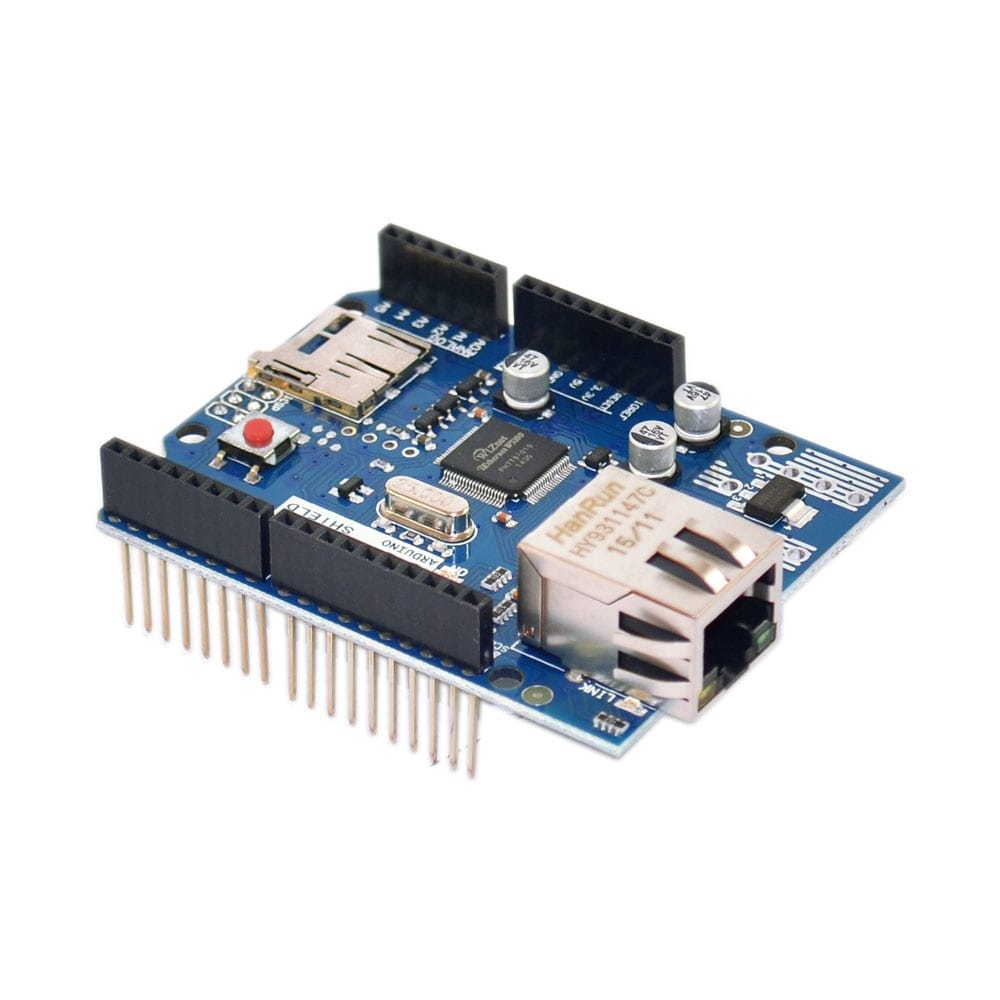
Connect your Arduino projects to the internet with this Ethernet Shield based on the reliable W5100 chip, a versatile expansion board designed specifically for Arduino Uno and compatible boards. This R3 version Ethernet shield provides simple and robust wired network connectivity, enabling your Arduino to function as a web server, IoT device, or network client for data logging, remote monitoring, and cloud connectivity applications
In stock
CompareDescription
UNO Shield Ethernet Shield W5100 R3 Development Board for Arduino
Connect your Arduino projects to the internet with this Ethernet Shield based on the reliable W5100 chip, a versatile expansion board designed specifically for Arduino Uno and compatible boards. This R3 version Ethernet shield provides simple and robust wired network connectivity, enabling your Arduino to function as a web server, IoT device, or network client for data logging, remote monitoring, and cloud connectivity applications .
The shield is built around the WIZnet W5100 Ethernet controller, which integrates a hardwired TCP/IP stack supporting TCP, UDP, ICMP, IPv4, ARP, IGMP, and PPPoE protocols . This hardware-based TCP/IP stack offloads network processing from the Arduino, freeing up microcontroller resources for your application code while maintaining reliable network communication . The W5100 supports up to four simultaneous socket connections, making it suitable for a wide range of networking applications .
The shield maintains the standard Arduino Uno form factor with stacking headers, allowing you to use additional shields on top while providing full access to all Arduino I/O pins . It includes a microSD card slot for data logging and serving web pages from external storage, and features a built-in RJ45 Ethernet jack with transformer for direct connection to your network router or switch . The onboard reset controller ensures proper power-up sequencing, and status LEDs provide visual feedback for link, full-duplex, and activity indicators . Whether you’re building a web-controlled device, a data logger that sends readings to a cloud server, or a simple home automation controller, this W5100 Ethernet shield provides the reliable network connectivity you need .
Key Features
WIZnet W5100 Ethernet Controller
Based on the WIZnet W5100 hardwired TCP/IP chip, supporting TCP, UDP, ICMP, IPv4, ARP, IGMP, and PPPoE protocols with a built-in 16KB buffer for efficient network communication .
Hardware TCP/IP Stack
Offloads network processing from the Arduino with a hardware-based TCP/IP stack, reducing software complexity and freeing microcontroller resources for application code .
Four Simultaneous Socket Connections
Supports up to four independent socket connections simultaneously, enabling complex networking applications such as web servers with multiple clients or data streams .
Standard Arduino Shield Form Factor
Designed for Arduino Uno, Leonardo, and compatible boards with stacking headers that allow additional shields to be placed on top while maintaining access to all I/O pins .
MicroSD Card Slot
Integrated microSD card slot for data logging, web page storage, and firmware updates, allowing the Arduino to serve files directly from removable storage .
RJ45 Ethernet Connector
Built-in RJ45 jack with integrated magnetics for direct connection to network switches, routers, and modems using standard Ethernet cables .
Status LED Indicators
Onboard LEDs provide visual feedback for power, link status, full-duplex operation, and data activity, simplifying network troubleshooting .
Reset Controller
Includes a reset controller that ensures proper power-up sequencing and reliable operation of the Ethernet controller and SD card .
3.3V and 5V Logic Compatible
Operates with 3.3V logic levels (W5100) while interfacing safely with 5V Arduino boards, making it compatible with both 3.3V and 5V systems .
Wide Software Support
Fully supported by the standard Arduino Ethernet library, with extensive documentation and example sketches for web server, web client, and DHCP functionality .
Specifications
| Parameter | Value |
|---|---|
| Ethernet Controller | WIZnet W5100 |
| Protocols Supported | TCP, UDP, ICMP, IPv4, ARP, IGMP, PPPoE |
| Socket Connections | Up to 4 simultaneous |
| Internal Buffer | 16KB (TX/RX buffer per socket) |
| Network Interface | RJ45 with integrated transformer |
| SD Card Slot | microSD (SPI interface) |
| Logic Voltage | 3.3V (5V tolerant) |
| Operating Voltage | 5V (from Arduino) |
| Current Consumption | Approximately 180mA |
| Dimensions | Standard Arduino shield size |
| Compatibility | Arduino Uno, Leonardo, Mega (with adapter) |
Pin Configuration
The Ethernet shield uses the following Arduino pins:
| Pin | Function | Description |
|---|---|---|
| 10 | SS (CS) | SPI chip select for Ethernet controller |
| 11 | MOSI | SPI data from Arduino to W5100 |
| 12 | MISO | SPI data from W5100 to Arduino |
| 13 | SCK | SPI clock |
| 4 | SD_CS | SPI chip select for microSD card (if used) |
Note: Pin 10 is the dedicated chip select for the Ethernet controller. Do not use pin 10 for other purposes when the Ethernet shield is active. The microSD card uses pin 4 for chip select.
Wiring Diagram
Shield Installation
Arduino Uno              Ethernet Shield
-----------              --------------
Stack directly on top of Arduino (using stacking headers)
Network Connection
Ethernet Shield -----> Ethernet Cable -----> Router/Switch/Modem
Arduino Code Example – Web Server
#include <SPI.h>
#include <Ethernet.h>

// MAC address (must be unique on your network)
byte mac[] = { 0xDE, 0xAD, 0xBE, 0xEF, 0xFE, 0xED };

// IP address (use DHCP or static)
IPAddress ip(192, 168, 1, 100);

// Initialize Ethernet server on port 80
EthernetServer server(80);

void setup() {
  Serial.begin(9600);

  // Start Ethernet connection
  Ethernet.begin(mac, ip);
  server.begin();

  Serial.print("Server is at ");
  Serial.println(Ethernet.localIP());
}

void loop() {
  EthernetClient client = server.available();

  if (client) {
    Serial.println("New client connected");

    // HTTP request handling
    while (client.connected()) {
      if (client.available()) {
        char c = client.read();
        // Read and discard HTTP request
        if (c == '\n' && client.available() == 0) {
          // Send HTTP response
          client.println("HTTP/1.1 200 OK");
          client.println("Content-Type: text/html");
          client.println("Connection: close");
          client.println();
          client.println("<!DOCTYPE HTML>");
          client.println("<html>");
          client.println("<h1>Arduino Ethernet Shield</h1>");
          client.println("<p>Analog Input Values:</p>");

          // Read and display analog inputs
          for (int i = 0; i < 6; i++) {
            int sensor = analogRead(i);
            client.print("A");
            client.print(i);
            client.print(": ");
            client.print(sensor);
            client.println("<br>");
          }

          client.println("</html>");
          break;
        }
      }
    }

    delay(1);
    client.stop();
    Serial.println("Client disconnected");
  }
}
Arduino Code Example – Web Client (Data Logger)
#include <SPI.h>
#include <Ethernet.h>

byte mac[] = { 0xDE, 0xAD, 0xBE, 0xEF, 0xFE, 0xED };
IPAddress server(192, 168, 1, 200);  // Target server IP

EthernetClient client;

void setup() {
  Serial.begin(9600);

  if (Ethernet.begin(mac) == 0) {
    Serial.println("Failed to configure Ethernet using DHCP");
    // Fall back to static IP
    IPAddress ip(192, 168, 1, 100);
    Ethernet.begin(mac, ip);
  }

  delay(1000);
  Serial.println("Connecting...");

  if (client.connect(server, 80)) {
    Serial.println("Connected");
    client.println("GET /data HTTP/1.1");
    client.println("Host: 192.168.1.200");
    client.println("Connection: close");
    client.println();
  } else {
    Serial.println("Connection failed");
  }
}

void loop() {
  if (client.available()) {
    char c = client.read();
    Serial.print(c);
  }

  if (!client.connected()) {
    Serial.println();
    Serial.println("Disconnecting.");
    client.stop();
    while (true);
  }
}
Common Applications
-
Web servers for device control and monitoring
-
IoT data loggers sending readings to cloud platforms
-
Home automation controllers
-
Network-enabled sensors and actuators
-
Remote equipment monitoring
-
Industrial control systems
-
Educational networking projects
-
Ethernet-enabled weather stations
Package Contents
-
1 x Ethernet Shield W5100 R3 for Arduino
درع إيثرنت UNO Shield W5100 R3 لوحة تطوير لـ Arduino
قم بتوصيل مشاريع Arduino الخاصة بك بالإنترنت باستخدام درع الإيثرنت القائم على شريحة W5100 الموثوقة، وهي لوحة توسعة متعددة الاستخدامات مصممة خصيصًا لـ Arduino Uno واللوحات المتوافقة. يوفر درع الإيثرنت من الإصدار R3 اتصالاً شبكيًا سلكيًا بسيطًا وقويًا، مما يمكن Arduino من العمل كخادم ويب أو جهاز إنترنت الأشياء أو عميل شبكة لتطبيقات تسجيل البيانات والمراقبة عن بُعد والاتصال بالسحابة .
تم بناء الدرع حول وحدة التحكم في الإيثرنت WIZnet W5100، التي تدمج مكدس TCP/IP المضمن في الأجهزة ويدعم بروتوكولات TCP و UDP و ICMP و IPv4 و ARP و IGMP و PPPoE . يقوم مكدس TCP/IP المضمن في الأجهزة هذا بإزالة معالجة الشبكة من Arduino، مما يوفر موارد المتحكم الدقيق لرمز تطبيقك مع الحفاظ على اتصال شبكة موثوق . يدعم W5100 ما يصل إلى أربع توصيلات مآخذ متزامنة، مما يجعله مناسبًا لمجموعة واسعة من تطبيقات الشبكات .
يحافظ الدرع على عامل شكل Arduino Uno القياسي مع رؤوس تكديس، مما يسمح لك باستخدام دروع إضافية في الأعلى مع توفير وصول كامل لجميع دبابيس الإدخال/الإخراج في Arduino . يتضمن فتحة بطاقة microSD لتسجيل البيانات وتقديم صفحات الويب من تخزين خارجي، ويتميز بمقبس RJ45 مدمج مع محول للاتصال المباشر بموجه الشبكة أو المحول الخاص بك . يضمن وحدة التحكم في إعادة الضبط المدمجة تسلسل تشغيل الطاقة بشكل صحيح، وتوفر مصابيح LED للحالة تغذية راجعة بصرية لحالة الاتصال وازدواجية الاتجاه ونشاط البيانات . سواء كنت تبني جهازًا يتم التحكم فيه عبر الويب أو مسجل بيانات يرسل قراءات إلى خادم سحابي أو وحدة تحكم بسيطة في أتمتة المنزل، فإن درع الإيثرنت W5100 هذا يوفر اتصال الشبكة الموثوق الذي تحتاجه .
المميزات الرئيسية
وحدة تحكم إيثرنت WIZnet W5100
تعتمد على شريحة WIZnet W5100 المضمنة TCP/IP، وتدعم بروتوكولات TCP و UDP و ICMP و IPv4 و ARP و IGMP و PPPoE مع مخزن مؤقت مدمج 16KB للاتصال الشبكي الفعال .
مكدس TCP/IP المضمن في الأجهزة
يزيل معالجة الشبكة من Arduino باستخدام مكدس TCP/IP المضمن في الأجهزة، مما يقلل تعقيد البرمجيات ويحرر موارد المتحكم الدقيق لرمز التطبيق .
أربع توصيلات مآخذ متزامنة
يدعم ما يصل إلى أربع توصيلات مآخذ مستقلة في وقت واحد، مما يتيح تطبيقات شبكات معقدة مثل خوادم الويب مع عملاء متعددين أو تدفقات بيانات .
عامل شكل درع Arduino القياسي
مصمم لـ Arduino Uno و Leonardo واللوحات المتوافقة مع رؤوس تكديس تسمح بوضع دروع إضافية في الأعلى مع الحفاظ على الوصول لجميع دبابيس الإدخال/الإخراج .
فتحة بطاقة microSD
فتحة بطاقة microSD مدمجة لتسجيل البيانات وتخزين صفحات الويب وتحديثات البرامج الثابتة، مما يسمح لـ Arduino بتقديم الملفات مباشرة من تخزين قابل للإزالة .
موصل إيثرنت RJ45
مقبس RJ45 مدمج مع محول للاتصال المباشر بمفاتيح الشبكة وأجهزة التوجيه والمودمات باستخدام كابلات إيثرنت القياسية .
مصابيح LED لحالة التشغيل
توفر مصابيح LED المدمجة تغذية راجعة بصرية للطاقة وحالة الاتصال وازدواجية الاتجاه ونشاط البيانات، مما يبسط استكشاف أخطاء الشبكة وإصلاحها .
وحدة تحكم في إعادة الضبط
يتضمن وحدة تحكم في إعادة الضبط تضمن تسلسل تشغيل الطاقة بشكل صحيح وتشغيلًا موثوقًا لوحدة التحكم في الإيثرنت وبطاقة SD .
متوافق مع منطق 3.3V و 5V
يعمل بمستويات منطق 3.3V بينما يتصل بأمان مع لوحات Arduino 5V، مما يجعله متوافقًا مع كل من أنظمة 3.3V و 5V .
دعم برمجي واسع
مدعوم بالكامل بمكتبة Ethernet القياسية لـ Arduino، مع توثيق واسع وأمثلة برمجية لخادم الويب وعميل الويب ووظيفة DHCP .
المواصفات الفنية
| المعلمة | القيمة |
|---|---|
| وحدة التحكم في الإيثرنت | WIZnet W5100 |
| البروتوكولات المدعومة | TCP, UDP, ICMP, IPv4, ARP, IGMP, PPPoE |
| توصيلات المآخذ | حتى 4 متزامنة |
| المخزن المؤقت الداخلي | 16KB |
| واجهة الشبكة | RJ45 مع محول مدمج |
| فتحة بطاقة SD | microSD |
| جهد المنطق | 3.3V |
| جهد التشغيل | 5V |
| استهلاك التيار | حوالي 180 مللي أمبير |
| الأبعاد | حجم درع Arduino القياسي |
| التوافق | Arduino Uno، Leonardo، Mega |
تكوين الدبابيس
| الدبوس | الوظيفة |
|---|---|
| 10 | اختيار الشريحة SS لجهاز الإيثرنت |
| 11 | MOSI |
| 12 | MISO |
| 13 | SCK |
| 4 | اختيار الشريحة لبطاقة SD |
التطبيقات الشائعة
-
خوادم ويب للتحكم في الأجهزة ومراقبتها
-
مسجلات بيانات إنترنت الأشياء ترسل القراءات إلى منصات سحابية
-
وحدات تحكم أتمتة المنزل
-
أجهزة استشعار ومشغلات متصلة بالشبكة
-
مراقبة المعدات عن بُعد
-
أنظمة التحكم الصناعية
-
مشاريع الشبكات التعليمية
-
محطات طقس متصلة بالإيثرنت
محتويات العلبة
-
1 × درع إيثرنت W5100 R3 لـ Arduino
Reviews
There are no reviews yet