0
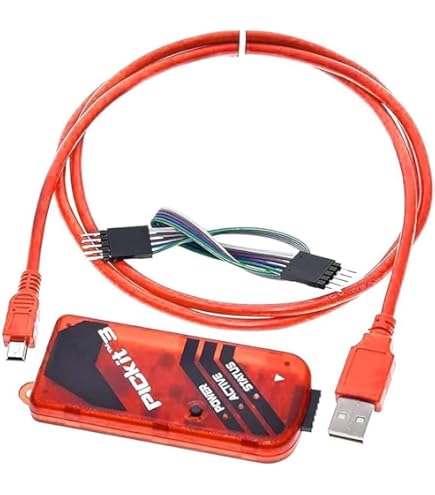
PICKIT3 PIC Programmer Kit with ZIF Adapter
27,000 د.ع
Program, debug, and test your PIC microcontroller projects with this PICKIT3 PIC Programmer Kit, a versatile development tool designed for engineers, hobbyists, and students working with Microchip PIC microcontrollers. This complete kit includes the PICKIT3 programmer unit along with a dedicated programmer adapter seat (often referred to as a “Monopoly” seat), providing a reliable and user-friendly solution for programming a wide range of PIC devices.
In stock
CompareDescription
PICKIT3 PIC Programmer Kit – Offline Programming Tool for PIC Microcontrollers with ZIF Adapter Seat
Program, debug, and test your PIC microcontroller projects with this PICKIT3 PIC Programmer Kit, a versatile development tool designed for engineers, hobbyists, and students working with Microchip PIC microcontrollers. This complete kit includes the PICKIT3 programmer unit along with a dedicated programmer adapter seat (often referred to as a “Monopoly” seat), providing a reliable and user-friendly solution for programming a wide range of PIC devices.
The PICKIT3 programmer connects to your computer via USB and interfaces with Microchip’s MPLAB IDE (Integrated Development Environment) or MPLAB X IDE, allowing you to program and debug PIC microcontrollers in-system using the ICSP (In-Circuit Serial Programming) protocol . A key feature of this kit is the offline programming capability, which allows you to store a hex file directly on the programmer. This enables you to program multiple devices without needing a constant connection to a PC, making it ideal for small-scale production or field updates where carrying a laptop is impractical.
The included programmer adapter seat (ZIF socket adapter) provides a convenient zero-insertion-force socket that accommodates various DIP package sizes, including 8-pin, 14-pin, 18-pin, 20-pin, 28-pin, and 40-pin PIC microcontrollers . This seat simplifies the programming process by allowing you to easily insert and remove chips without bending pins, eliminating the need for soldering or building a dedicated test circuit for each device.
Key Features
Offline Programming Capability
Store a hex file directly on the programmer and program PIC microcontrollers without a continuous PC connection. This is perfect for batch programming, field updates, or lab environments where you need to program multiple chips efficiently.
USB Connectivity
Connects to your computer via USB for easy integration with MPLAB X IDE and other development environments. The USB interface provides both power and communication through a single cable.
MPLAB IDE Compatibility
Fully compatible with Microchip’s MPLAB X IDE and MPLAB IPE (Integrated Programming Environment), ensuring seamless integration into professional development workflows.
Wide Device Support
Supports a broad range of PIC microcontrollers, including PIC10F, PIC12F, PIC16F, PIC18F, PIC24F, PIC24H, dsPIC30F, dsPIC33F, and PIC32 series devices.
Programmer Adapter Seat Included
The kit includes a dedicated programmer seat (ZIF adapter) that supports 8 to 40-pin DIP package PIC microcontrollers. This seat provides a zero-insertion-force socket for easy chip placement and removal without risking pin damage.
ICSP 6-Pin Connector
Features a standard 6-pin ICSP (In-Circuit Serial Programming) header for in-system programming directly on your target board, allowing you to program chips already soldered into your circuit.
Status LEDs
Onboard LEDs provide visual feedback for power, programming activity, and error conditions, making it easy to monitor the programmer’s status at a glance.
Reliable and Stable Operation
Designed with robust components and over-voltage protection to ensure reliable operation and protect both the programmer and your target microcontrollers.
Specifications
| Parameter | Value |
|---|---|
| Product Name | PICKIT3 PIC Programmer Kit with Adapter Seat |
| Compatible Software | MPLAB X IDE, MPLAB IPE |
| Host Interface | USB 2.0 (Full Speed) |
| Target Voltage | 2.0V to 5.5V |
| Programming Interface | ICSP (6-pin) |
| Offline Programming | Yes (store hex file for standalone programming) |
| Supported Devices | PIC10F, PIC12F, PIC16F, PIC18F, PIC24F, PIC24H, dsPIC30F, dsPIC33F, PIC32 series |
| Adapter Seat Support | 8-pin, 14-pin, 18-pin, 20-pin, 28-pin, 40-pin DIP packages |
| Adapter Seat Type | Zero-Insertion-Force (ZIF) socket |
| Power Supply | USB bus-powered (optional external power for offline mode) |
| Operating Temperature | 0°C to 70°C |
| Dimensions (Programmer) | Approximately 80mm x 45mm x 15mm |
| Included Components | PICKIT3 programmer, adapter seat, USB cable (typically) |
Pin Configuration (ICSP Header)
| Pin | Function | Description |
|---|---|---|
| 1 | MCLR/VPP | Master Clear / Programming Voltage |
| 2 | VDD | Target Power Supply (2.0V-5.5V) |
| 3 | VSS | Ground |
| 4 | ICSPDAT | ICSP Data (PGD) |
| 5 | ICSPCLK | ICSP Clock (PGC) |
| 6 | LVP | Low Voltage Programming (optional) |
Adapter Seat Configuration
The included programmer adapter seat (ZIF socket board) allows you to program DIP package PIC microcontrollers without soldering. To use:
-
Select the correct programming area: For 28-pin or 40-pin devices, align the chip with the left side of the socket. For 8, 14, 18, or 20-pin devices, align with the corresponding marked area
-
Set the configuration jumpers: Move the shorting caps to the position (A or B) that matches your device package size
-
Insert the chip: Gently place the microcontroller into the ZIF socket and lock it in place using the lever
-
Connect the programmer: Use the 6-pin ICSP cable to connect the programmer to the adapter seat
-
Program: Use MPLAB IPE or MPLAB X IDE to load your hex file and program the device
Wiring Diagram
Connecting to Target Board (ICSP)
PICKIT3 Programmer          Target Board (ICSP Header)
-----------------           --------------------------
Pin 1 (MCLR/VPP)  ----->    MCLR/VPP
Pin 2 (VDD)       ----->    VDD (2.0V-5.5V)
Pin 3 (VSS)       ----->    GND
Pin 4 (PGD)       ----->    ICSPDAT/PGD
Pin 5 (PGC)       ----->    ICSPCLK/PGC
Connecting to Adapter Seat
PICKIT3 Programmer          Adapter Seat (ICSP Header)
-----------------           --------------------------
6-pin ICSP Header  ----->    6-pin ICSP Header (match pin-to-pin)
Software Setup
Step 1: Install MPLAB X IDE
-
Download MPLAB X IDE from the Microchip website
-
Run the installer and follow the on-screen instructions
-
Launch MPLAB X IDE after installation
Step 2: Connect the Programmer
-
Connect the PICKIT3 to your computer via USB
-
Windows should automatically detect and install drivers
-
The power LED on the programmer should illuminate
Step 3: Select Programmer in MPLAB X
-
Open MPLAB X IDE
-
Go to Tools > Options > Embedded
-
Ensure PICKIT3 appears in the list of available programmers
-
Select PICKIT3 from the Connected Hardware toolbar
Step 4: Program a Device
-
Open your project or load a hex file
-
Click the Make and Program Device button
-
The programmer will verify communication and program the target device
Offline Programming Setup
-
In MPLAB IPE, load your hex file
-
Select PICKIT3 as the programmer
-
Click Program to write the hex file to the programmer’s internal memory
-
Disconnect the programmer from your PC
-
Connect the programmer to external power (if required)
-
Connect the programmer to your target device or adapter seat
-
Press the programming button (if available) to program the device
Supported Device Families (Partial List)
| Family | Examples |
|---|---|
| PIC10F | PIC10F200, PIC10F202, PIC10F204, PIC10F206, PIC10F220, PIC10F222 |
| PIC12F | PIC12F508, PIC12F509, PIC12F510, PIC12F519, PIC12F609, PIC12F615 |
| PIC16F | PIC16F84A, PIC16F628A, PIC16F877A, PIC16F887, PIC16F1937 |
| PIC18F | PIC18F452, PIC18F4550, PIC18F4620, PIC18F2550, PIC18F97J94 |
| PIC24F | PIC24FJ64GA004, PIC24FJ128GA010 |
| PIC24H | PIC24HJ64GP504, PIC24HJ128GP506 |
| dsPIC30F | dsPIC30F2010, dsPIC30F4011, dsPIC30F6014A |
| dsPIC33F | dsPIC33FJ128GP804, dsPIC33FJ256GP710 |
| PIC32 | PIC32MX220F032B, PIC32MX250F128B, PIC32MX440F256H |
Common Applications
-
Firmware development and debugging for PIC microcontrollers
-
Production programming of multiple PIC devices
-
Educational embedded systems and microcontroller courses
-
Prototyping and testing of custom PIC-based circuits
-
Field updates for existing PIC-based products (offline mode)
-
Repair and restoration of vintage electronic equipment
Important Usage Notes
-
Always verify that the target device voltage matches the programmer’s VDD setting
-
For offline programming, ensure the programmer has adequate power (may require external supply)
-
Do not disconnect the programmer during programming or verify operations
-
Ensure the adapter seat configuration jumpers are set correctly for your device package
-
Handle the ZIF socket gently; do not force the lever
-
For in-circuit programming, minimize cable length between programmer and target board (under 12 inches recommended)
-
Keep the programmer firmware updated through MPLAB X IDE
Package Contents
-
1 x PICKIT3 Programmer Unit
طقم مبرمج PICKIT3 PIC – أداة برمجة بدون اتصال بالكمبيوتر لمتحكمات PIC مع مقعد محول
قم ببرمجة وتصحيح واختبار مشاريع متحكمات PIC الخاصة بك باستخدام طقم مبرمج PICKIT3 PIC، وهو أداة تطوير متعددة الاستخدامات مصممة للمهندسين والهواة والطلاب الذين يعملون مع متحكمات PIC من Microchip. يشمل هذا الطقم الكامل وحدة المبرمج PICKIT3 بالإضافة إلى مقعد محول مخصص (يُعرف غالبًا باسم مقعد “Monopoly”)، مما يوفر حلاً موثوقًا وسهل الاستخدام لبرمجة مجموعة واسعة من أجهزة PIC.
يتصل المبرمج PICKIT3 بجهاز الكمبيوتر الخاص بك عبر USB ويتفاعل مع MPLAB IDE من Microchip، مما يسمح لك ببرمجة وتصحيح متحكمات PIC داخل النظام باستخدام بروتوكول ICSP. الميزة الرئيسية لهذا الطقم هي قدرة البرمجة بدون اتصال بالكمبيوتر، والتي تسمح لك بتخزين ملف سداسي عشري مباشرة على المبرمج. هذا يمكنك من برمجة أجهزة متعددة دون الحاجة إلى اتصال مستمر بجهاز كمبيوتر، مما يجعله مثاليًا للإنتاج الصغير أو التحديثات الميدانية حيث يكون حمل جهاز كمبيوتر محمول غير عملي.
يوفر مقعد محول المبرمج المضمن (مقبس ZIF) مقبسًا مناسبًا بقوة إدخال صفرية يستوعب أحجام حزم DIP المختلفة، بما في ذلك متحكمات PIC 8-pin و 14-pin و 18-pin و 20-pin و 28-pin و 40-pin. يبسط هذا المقعد عملية البرمجة من خلال السماح لك بإدخال وإزالة الرقائق بسهولة دون ثني الأطراف، مما يلغي الحاجة إلى اللحام أو بناء دائرة اختبار مخصصة لكل جهاز.
المميزات الرئيسية
قدرة البرمجة بدون اتصال بالكمبيوتر
قم بتخزين ملف سداسي عشري مباشرة على المبرمج وبرمجة متحكمات PIC دون الحاجة إلى اتصال مستمر بجهاز كمبيوتر. هذا مثالي للبرمجة المجمعة أو التحديثات الميدانية.
اتصال USB
يتصل بجهاز الكمبيوتر الخاص بك عبر USB للتكامل السهل مع MPLAB X IDE وبيئات التطوير الأخرى.
توافق مع MPLAB IDE
متوافق تمامًا مع MPLAB X IDE و MPLAB IPE من Microchip، مما يضمن تكاملًا سلسًا في سير العمل التطويري الاحترافي.
دعم واسع للأجهزة
يدعم مجموعة واسعة من متحكمات PIC، بما في ذلك سلسلة PIC10F و PIC12F و PIC16F و PIC18F و PIC24F و PIC24H و dsPIC30F و dsPIC33F و PIC32.
مقعد محول المبرمج مضمن
يتضمن الطقم مقعد مبرمج مخصص يدعم متحكمات PIC بحزم DIP من 8 إلى 40 دبوسًا. يوفر هذا المقعد مقبس ZIF لإدخال وإزالة الرقائق بسهولة دون خطر تلف الأطراف.
موصل ICSP 6 دبابيس
يتميز برأس ICSP قياسي 6 دبابيس للبرمجة داخل النظام مباشرة على لوحة الهدف الخاصة بك.
مصابيح LED للحالة
توفر مصابيح LED المدمجة تغذية راجعة بصرية للطاقة ونشاط البرمجة وحالات الخطأ.
المواصفات الفنية
| المعامل | القيمة |
|---|---|
| اسم المنتج | طقم مبرمج PICKIT3 PIC مع مقعد محول |
| البرامج المتوافقة | MPLAB X IDE، MPLAB IPE |
| واجهة المضيف | USB 2.0 |
| جهد الهدف | 2.0V إلى 5.5V |
| واجهة البرمجة | ICSP (6 دبابيس) |
| البرمجة بدون اتصال | نعم |
| الأجهزة المدعومة | PIC10F، PIC12F، PIC16F، PIC18F، PIC24F، dsPIC30F، dsPIC33F، PIC32 |
| دعم مقعد المحول | حزم DIP 8,14,18,20,28,40 دبوس |
| نوع مقعد المحول | مقبس ZIF |
| مصدر الطاقة | USB |
تكوين الأطراف (رأس ICSP)
| الدبوس | الوظيفة |
|---|---|
| 1 | MCLR/VPP |
| 2 | VDD |
| 3 | VSS |
| 4 | ICSPDAT (PGD) |
| 5 | ICSPCLK (PGC) |
| 6 | LVP |
إعداد البرمجيات
الخطوة 1: تثبيت MPLAB X IDE
-
قم بتنزيل MPLAB X IDE من موقع Microchip
-
قم بتشغيل المثبت واتبع التعليمات
-
قم بتشغيل MPLAB X IDE بعد التثبيت
الخطوة 2: توصيل المبرمج
-
قم بتوصيل PICKIT3 بجهاز الكمبيوتر الخاص بك عبر USB
-
سيكتشف Windows برامج التشغيل تلقائيًا
-
يجب أن يضيء LED الطاقة على المبرمج
الخطوة 3: تحديد المبرمج في MPLAB X
-
حدد PICKIT3 من شريط أدوات Connected Hardware
الخطوة 4: برمجة جهاز
-
افتح مشروعك أو قم بتحميل ملف سداسي عشري
-
انقر على زر Make and Program Device
التطبيقات الشائعة
-
تطوير البرامج الثابتة وتصحيح الأخطاء لمتحكمات PIC
-
برمجة إنتاجية لأجهزة PIC متعددة
-
دورات الأنظمة المدمجة التعليمية
-
النمذجة الأولية واختبار الدوائر القائمة على PIC
-
تحديثات ميدانية للمنتجات القائمة على PIC
محتويات العلبة
-
1 × وحدة مبرمج PICKIT3


Reviews
There are no reviews yet